Boxberry Tracking
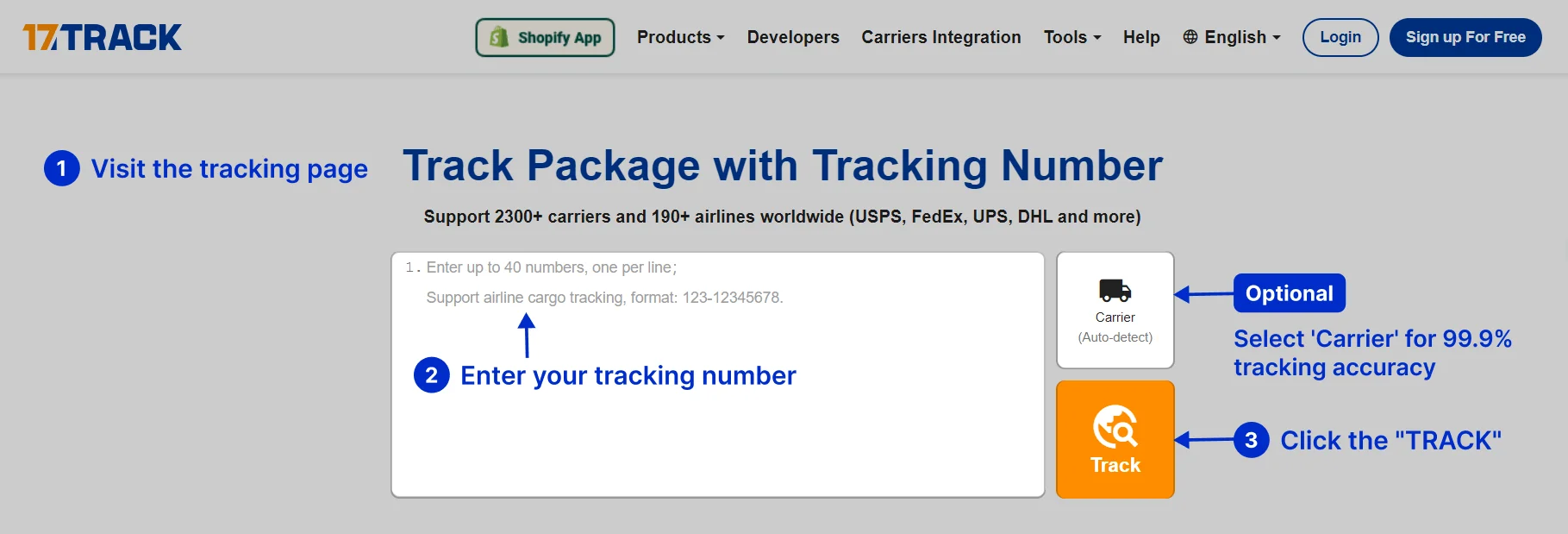
Please enter the Boxberry tracking number to check the latest shipping status.
About Boxberry
Boxberry is a parcel-delivery brand associated with pickup-point and delivery services. Shipment availability, delivery options, and customer actions depend on the service selected by the sender, the origin and destination, and the current shipment record.
| Field | Verified reference |
|---|---|
| Display name | Boxberry |
| Official website | https://boxberry.ru/ |
| Tracking route | Use the tracking function provided through the official Boxberry website or the tracking result supplied by the merchant. |
| Carrier role | Parcel logistics and delivery services connected with shipment collection, transport, delivery, and pickup-point operations. |
| Entity | Relationship summary |
|---|---|
| Boxberry | Boxberry is the carrier entity named in the shipment record when Boxberry is selected for delivery. |
| Official tracking | The official Boxberry website is the primary source for shipment events made available by Boxberry. |
| Merchant or marketplace | The merchant creates or shares the order and may need to resolve payment, address, refund, or shipment-creation issues. |
| 17TRACK | 17TRACK is an independent tracking platform that aggregates available carrier events and does not operate Boxberry transport. |
Quick Answer
Enter the Boxberry tracking number supplied by the sender into the official Boxberry tracking page or into 17TRACK. If no result appears, check the number character by character, confirm that it is a tracking number rather than an order number, and ask the sender whether the parcel has been handed to Boxberry. 17TRACK does not transport parcels, change addresses, approve refunds, or decide claims.
How to Track Boxberry Packages
| Route | Steps |
|---|---|
| Official Boxberry route | Open the official website, locate shipment tracking, enter the carrier-issued number, and review the latest event and destination information. |
| 17TRACK route | Open 17TRACK, paste the number, allow carrier detection or select Boxberry when available, and compare the event history with the merchant’s shipment details. |
| No number | Ask the sender or marketplace for the shipment number. An order number, invoice number, payment reference, or product SKU usually cannot replace a tracking number. |
| Number not active | A label or shipment record may exist before the first physical acceptance scan. The sender should confirm handover and destination details. |
Tracking Number Formats and Examples
Boxberry shipment identifiers can appear in a merchant message, label, receipt, or carrier record. Use the complete identifier exactly as supplied; avoid assuming that a prefix alone proves the service or that an order reference can be tracked.
Tracking Number Format
| Identifier family | Normalized pattern | ||||||||
|---|---|---|---|---|---|---|---|---|---|
| Boxberry shipment identifier | Use the complete carrier or merchant-provided identifier; a safe example is BX########, where # represents a redacted character. | ||||||||
View all details for Boxberry shipment identifiers
| |||||||||
| Merchant order or reference ID | A seller-defined value such as ORDER-#### may identify the purchase but may not retrieve carrier events. | ||||||||
View all details for merchant references
| |||||||||
Tracking Statuses and Meanings
| Status | Meaning |
|---|---|
| Shipment created or label prepared | Shipment data exists, but this does not by itself prove that Boxberry has physically received the parcel. |
| Accepted or received | A carrier or authorized location has recorded physical acceptance. |
| In transit | The parcel is moving through transport or sorting operations; individual scans may not appear at every movement. |
| Ready for pickup | The shipment is recorded as available at the designated pickup location. Follow the notification and identification requirements. |
| Out for delivery | The parcel has entered a delivery stage. Availability of a delivery time depends on the shipment record. |
| Delivered | A delivery completion event was recorded. If the parcel is missing, check the address, pickup location, recipient details, and seller support. |
| Exception or return | A delivery or transport issue requires review, or the parcel is moving back toward the sender. |
Services and Delivery Times
A reliable delivery estimate must come from the shipment service, origin, destination, acceptance time, and current carrier record. A tracking page may show an operational estimate, but an estimate is not automatically a guaranteed delivery commitment.
Service Comparison
| Service category | Best use |
|---|---|
| Pickup-point delivery | Orders for which the recipient can collect the parcel from the designated location. |
| Address delivery | Shipments assigned to a delivery address when the selected service supports that destination. |
| Business or marketplace shipment | Commercial orders where the merchant manages shipment creation, customer communications, and after-sales support. |
Delivery Time
| Timing element | How to interpret it |
|---|---|
| Published service standard | The service-specific expectation supplied by the carrier or seller for the selected route. |
| Tracking estimate | A route-specific estimate derived from the shipment record and current events. |
| Delay factors | Address quality, weekends, holidays, sorting volume, transport disruption, destination restrictions, and recipient availability can affect delivery. |
Destination Country Delivery Times
| Destination | Practical guidance |
|---|---|
| Domestic destination | Use the service-specific estimate shown by Boxberry or the merchant for the selected origin, destination, and delivery method. |
| Cross-border destination | Allow for export processing, transport, destination customs, partner handoff, and local delivery. A single universal day range should not be applied to every country. |
Common Tracking Problems and Solutions
Problem & Solution
| Problem or status | First action |
|---|---|
| Invalid number | Remove accidental spaces only when the tracking page requires it, compare every character with the seller message, and request the carrier number from the sender. |
| No tracking events | Ask whether the parcel has been physically handed over; a created label is not proof of acceptance. |
| No update for an extended period | Check the latest scan, destination, and expected window, then ask the sender to open a carrier inquiry when the applicable service rules allow it. |
| Address problem or failed delivery | Contact the sender and Boxberry through the official channel promptly; only the party permitted by the service may request a correction. |
| Delivered but not received | Check the delivery address, household members, reception desk, neighbors, pickup location, and delivery evidence; then contact the sender and carrier. |
| Lost or damaged parcel | Keep packaging and contents, photograph the condition, preserve the order evidence, and ask the sender which party must open the investigation or claim. |
| Customs or partner handoff delay | Check destination-country instructions and ask the sender or responsible destination operator whether documents, taxes, or identity information are required. |
International Shipping, Customs and Carrier Handoffs
For a cross-border shipment, the tracking number may remain the same or may be supplemented by a destination or partner identifier. Arrival in a country or at an exchange facility does not by itself prove that customs clearance is complete.
| Stage | Customer interpretation |
|---|---|
| Shipment creation | Electronic shipment data is prepared; physical custody may still remain with the sender. |
| Origin acceptance and sorting | The origin carrier or authorized location records receipt and routes the parcel. |
| Export processing | Export security, documentation, and transport preparation may occur before departure. |
| International transport | The parcel travels between origin and destination networks; scan gaps can occur. |
| Import customs | Authorities or an appointed broker may review the shipment, declaration, taxes, and restrictions. |
| Partner handoff and last mile | A destination operator may receive the parcel for local delivery. An electronic pre-advice is not the same as a physical handoff. |
Delivery Management and Post-shipment Options
| Option | How to proceed |
|---|---|
| Pickup | Use the pickup information attached to the shipment and follow the identification or notification requirements shown by the carrier. |
| Address correction | Ask the sender or Boxberry before delivery; eligibility depends on shipment stage and service conditions. |
| Redelivery | Review the failed-delivery instruction and contact the responsible delivery channel rather than creating a duplicate shipment. |
| Proof of delivery | Request available delivery evidence through the carrier or sender when a delivered scan is disputed. |
Lost, Damaged, Claims, Insurance and Refunds
| Process | Use when |
|---|---|
| Tracking inquiry | The event history is unclear or a shipment appears stalled. |
| Carrier investigation | The sender or other authorized party needs the carrier to investigate loss, misdelivery, or a transport exception. |
| Damage claim | The contents or packaging arrived damaged; retain all materials and collect photographs and value evidence. |
| Merchant refund | The commercial seller decides the buyer remedy under the order terms; 17TRACK cannot approve it. |
Shipping Restrictions and Special Handling
| Category | Practical risk |
|---|---|
| Dangerous goods | Batteries, aerosols, chemicals, and other regulated goods may require special handling or may be excluded. |
| Liquids and perishables | Packaging, leakage, temperature, and destination rules can affect acceptance and delivery. |
| Valuable or restricted goods | Declared value, documentation, and route limitations may apply. Check the current official rules before dispatch. |
Customer Service
| Channel | Best use |
|---|---|
| Official website | Open the Boxberry website for the current tracking and contact routes. |
| Sender or marketplace | Use this route for order references, wrong addresses, missing dispatch, refunds, or seller-managed claims. |
| Pickup location | Use the location information in the shipment record for collection or local delivery questions. |
| Information to prepare | Prepare the tracking number, sender and recipient details, dispatch date, latest scan, destination, photographs, and order evidence. |
Ecommerce and Business Tracking
Merchants should keep the order reference and carrier tracking number as separate fields. A multi-carrier platform can normalize events and support exception monitoring, while the carrier or seller remains responsible for transport, delivery changes, claims, and refunds.
Developer/API Comparison
| Option | Provider | ||||||
|---|---|---|---|---|---|---|---|
| Official carrier integration | Boxberry | ||||||
View all details for the official carrier integration
| |||||||
| Multi-carrier tracking | 17TRACK | ||||||
View all details for the 17TRACK integration
| |||||||
FAQ
Basic FAQs
Enter the complete tracking number on the official Boxberry website or use 17TRACK to view available shipment events.
Check the seller’s dispatch email, order page, shipping label, receipt, or pickup notification.
The identifier is supplied with the shipment record; use the complete value rather than identifying the service from a prefix alone.
The first event appears after shipment data is created or a physical acceptance scan is recorded, depending on the shipment stage.
The parcel may be between scans, awaiting handover, affected by a processing delay, or associated with an incorrect identifier.
Use the estimate for the selected route and service; timing depends on origin, destination, handling, weekends, and current transport conditions.
Read the latest event, check the address and pickup instructions, and contact the sender or official Boxberry support promptly.
Check the address, household members, reception desk, neighbors, and pickup location, then request delivery evidence and contact the sender.
Preserve the packaging, photograph the damage, keep value evidence, and ask the sender which authorized party must begin the carrier investigation.
Use the current contact and tracking routes on the official Boxberry website, and keep the tracking number ready.
Expert FAQs
No. Label or shipment creation records may precede physical acceptance; an acceptance event is the stronger indication that the carrier received the parcel.
Yes, a merchant order reference, carrier identifier, or partner identifier can appear in the same commercial workflow; ask the sender to identify the carrier number.
No. Arrival at a customs or exchange facility is different from a customs-release event and may be followed by document, tax, or inspection steps.
Eligibility depends on the shipment stage and service rules; contact the sender and Boxberry rather than assuming the recipient can change the address.
No. 17TRACK displays available tracking data but cannot change delivery instructions, redirect a parcel, approve a refund, or decide a claim.
Electronic pre-advice transfers shipment data, while a handoff requires the responsible operator to receive the physical parcel and record an applicable event.
Tracking API
// 1. Boxberry official tracking API:
// Current public official tracking API endpoint and authentication
// should be taken from current Boxberry developer documentation.
// 2. 17TRACK API:
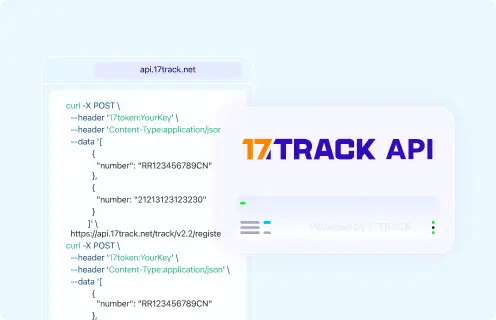
POST https://api.17track.net/track/v2.4/register
Headers:
17token: YourKey
Content-Type: application/json
Body:
[
{
"number": "TRACKING_NUMBER",
"carrier": "CARRIER_CODE"
}
]
// Confirm the current Boxberry carrier code in 17TRACK documentation
// before sending production requests.
Sources & References
- Boxberry official website. Boxberry
- 17TRACK API documentation. 17TRACK
- 17TRACK tracking platform. 17TRACK
17TRACK is an independent tracking platform and is not affiliated with Boxberry.
Track your package
Global express parcel tracking service