How to Integrate Shipment Tracking Data into Bi Systems for Cross-Border Ecommerce
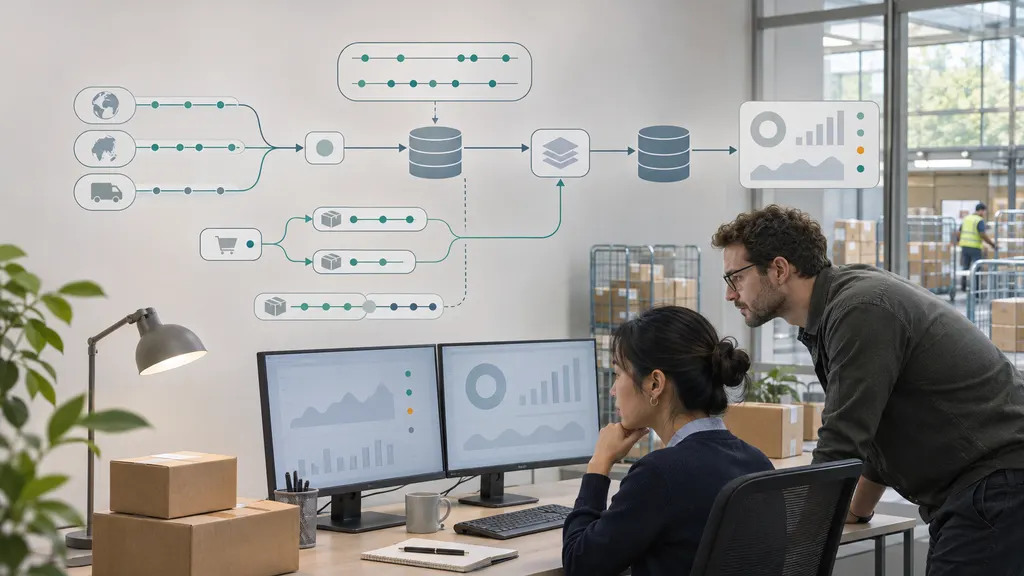
To integrate shipment tracking data into BI systems for cross-border ecommerce, collect tracking updates through an API or supported event feed, store the original records, normalize carrier events, and connect each shipment to your order data. Then build warehouse models that calculate delivery performance, exceptions, and data freshness before exposing those models to dashboards. The most important design choice is to separate what happened to a parcel from when your systems learned about it.
This guide is for data engineers, analytics teams, and logistics operations managers building that pipeline. Engineering should own ingestion and reliability; operations should define shipment milestones and exception rules; analytics should own metric definitions. Without those shared definitions, a technically successful integration can still produce misleading reports.
Build a data pipeline, not a dashboard-to-API connection
A useful reference architecture is:
Tracking source → ingestion service → durable raw storage → transformation and validation → analytics warehouse → BI semantic model → dashboards and alerts
Keep order, fulfillment, and customer-service data alongside the tracking pipeline, with controlled joins between them. Tracking events explain parcel movement. They do not, by themselves, establish the customer's promised delivery date, order value, refund outcome, or support history.
Connecting a dashboard directly to a tracking API may work for a small prototype, but it makes historical reconstruction, retries, and shared metric definitions harder to control. For recurring operational reporting, persist the data before presenting it.
Where 17TRACK fits
17TRACK Tracking API is a relevant source option for a tracking-data integration. Use its official API documentation to confirm the integration contract for your implementation. Validate authentication, shipment registration, available event fields, update delivery methods, usage limits, and error handling before designing against them.
Treat the tracking source and the BI pipeline as separate layers. Do not assume that access to tracking data includes a native connector to your warehouse or BI tool. Test the actual carriers, shipping services, destination markets, and account configuration you intend to use.
1. Define the operational questions and reporting grain
Start with decisions the dashboard must support. A logistics manager investigating delayed parcels needs shipment-level exceptions. A commercial analyst comparing shipping services needs delivery cohorts and consistent denominators. Those are related views, but they should not be built from an undefined collection of tracking statuses.
- Delivery performance: Which shipping lanes miss the customer promise?
- Exception management: Which active shipments need investigation?
- Carrier handoffs: Where does visibility disappear between transport stages?
- Customer impact: Which delivery patterns are associated with support contacts or refunds?
- Integration health: Which sources are delivering incomplete or stale data?
Choose a primary reporting grain: usually one physical parcel or shipment, not one order. An order can contain several parcels, and a replacement shipment can exist alongside the original. Preserve these relationships rather than forcing every order into one tracking number.
Define order-level completion separately. For example, an order might count as delivered only when all required outbound parcels are delivered. Returns, canceled parcels, and replacements require explicit treatment so they do not distort the denominator.
2. Create shipment identity before importing events
Do not use a tracking number as your only database key. Its interpretation can depend on the carrier and shipment context. Create an internal shipment identifier and retain the external references needed to reconcile records.
| Field | Purpose | Design consideration |
|---|---|---|
| shipment_id | Stable internal identity | Keep it independent of changes to external references. |
| order_id and fulfillment_id | Connect shipping to commerce records | Support split orders and replacement shipments. |
| tracking_number and carrier_reference | Identify the tracked movement | Retain both the raw values and any standardized identifiers. |
| shipment_leg_id | Represent a transport stage | Use when separate international and last-mile references exist. |
| source_system | Explain record provenance | Distinguish order-system values from tracking-source values. |
| promised_delivery_at | Measure performance against a commitment | Preserve the applicable promise and its revision history. |
Build a bridge table when one shipment has multiple tracking references or legs. This allows analysts to follow a cross-border parcel through a handoff without counting it as two delivered shipments.
3. Ingest updates with replay and reconciliation in mind
Use the update mechanism supported by your source. If event delivery is available, receive updates through a service that validates requests and writes accepted payloads to durable storage. If polling is required, schedule requests around documented limits and business freshness requirements.
For event-driven ingestion, acknowledge successful receipt only after the payload is safely persisted or placed in a durable queue. Keep the receiving endpoint lightweight; perform expensive transformations downstream. Follow the source's documented authentication and request-verification mechanisms rather than inventing an assumed signature format.
For polling, store retrieval checkpoints and overlap retrieval windows where the API permits it. An overlap can help capture delayed updates, but it also requires deduplication. Do not assume that a pagination cursor represents a permanent historical checkpoint unless the documentation says so.
- Retain the original payload, receipt timestamp, source identifier, and ingestion-run identifier.
- Retry transient failures with controlled backoff and respect documented rate limits.
- Route repeatedly failing records to a review queue instead of silently discarding them.
- Reconcile tracked shipments against the fulfillment system to identify missing registrations.
- Run periodic checks for active shipments whose tracking data has stopped updating.
Make writes idempotent: processing the same update again should not create an additional logical event. Prefer a documented stable event identifier. If none exists, define and test a composite fingerprint using shipment identity, event time, event code, location, and other relevant fields. Preserve raw records so collisions or corrections can be investigated.
4. Normalize events without losing their meaning
Carrier descriptions should not become dashboard categories directly. Create a documented mapping layer that translates source events into a smaller set of business milestones while retaining the original description and code.
A starting taxonomy might include information received, accepted by carrier, in transit, out for delivery, delivered, delivery attempt, exception, and return movement. These are proposed internal categories, not a claim that every tracking source uses the same statuses.
Keep milestone status separate from exception attributes. A shipment can remain in transit while also carrying a customs-related exception. Forcing both concepts into one field makes it difficult to distinguish physical progress from operational risk.
Handle cross-border ambiguity explicitly
- Customs events: Retain the reported event meaning. Do not interpret every customs reference as a delay or a completed clearance.
- Carrier handoffs: Associate linked references with the same shipment where the relationship is verified. A new reference does not necessarily mean a new parcel.
- Unknown events: Keep them visible as unmapped records. Do not force unfamiliar codes into a convenient category.
- Corrections: Allow later information to revise the interpreted state without deleting the earlier evidence.
Version the mapping rules. When an interpretation changes, you should be able to explain whether a historical chart changed because delivery performance changed or because the transformation logic changed.
5. Model event time, ingestion time, and local dates separately
Store at least the reported event timestamp and the timestamp when your platform received the record. A warehouse load timestamp is also useful for diagnosing internal processing delays. These timestamps answer different questions.
Use an offset-aware interchange format where available. RFC 3339 defines a timestamp format that includes UTC or a numeric offset. Preserve the original value, normalize unambiguous instants to UTC for elapsed-time calculations, and derive local reporting dates using an explicit timezone rule.
If a source supplies a local timestamp without an offset or reliable timezone, mark that uncertainty. Do not silently treat it as UTC. Country-level assumptions can be insufficient where multiple timezones apply.
Late-arriving events also require care. An older event received today should not automatically replace a newer shipment state. Derive current state using documented event semantics, timestamps, and correction rules, not simply the most recently inserted database row.
6. Build warehouse models with clear metric contracts
A practical model separates event history from shipment summaries:
- Event fact: One row per logical tracking event, with provenance and normalized attributes.
- Shipment fact: One row per shipment, containing derived milestones and current state.
- Relationship tables: Links between orders, parcels, transport legs, and external references.
- Dimensions: Carrier, service, origin, destination, channel, and other approved reporting attributes.
Avoid joining order revenue directly to every tracking event and then summing it. That repeats the order value across event rows. Aggregate at the appropriate grain or use explicitly controlled relationships in the semantic model.
| Metric | Recommended definition | Interpretation safeguard |
|---|---|---|
| Transit duration | Delivered timestamp minus first qualifying carrier-acceptance timestamp | Report missing acceptance scans; do not substitute label creation without disclosure. |
| On-time delivery rate | Eligible shipments delivered by the applicable promise divided by eligible shipments in the promise-due cohort | Define cutoff, timezone, exclusions, and treatment of undelivered overdue parcels. |
| Exception incidence | Distinct shipments with a qualifying exception divided by the eligible shipment cohort | Count shipments, not repeated exception messages. |
| Tracking inactivity | Reporting time minus the last qualifying tracking-event time | Inactivity is a signal to investigate, not proof that a parcel is lost. |
| Observed update lag | Receipt time minus reported event time | Separate source latency from timestamp uncertainty and warehouse delay. |
Use delivered cohorts to understand completed transit durations, but do not treat them as the whole performance picture. Slow shipments still in transit are absent from that calculation. Pair completed-delivery statistics with an open-shipment aging view and a promise-due cohort.
For comparisons across shipping lanes, show sample size, service level, destination, and the reporting period. Differences in shipment mix can explain an apparent carrier-performance gap. A dashboard should help investigate that gap rather than present an unsupported causal conclusion.
7. Validate the pipeline before publishing operational dashboards
Test scenarios, not just successful API responses. Include a normal delivery, split order, replacement shipment, carrier handoff, duplicate update, out-of-order event, missing timezone, customs-related event, return movement, and late correction.
For each scenario, trace the raw payload through normalized events, shipment summaries, and the final dashboard. Operations should confirm that the displayed status and recommended action match the underlying evidence.
- Coverage: Compare eligible fulfilled shipments with shipments present in the tracking pipeline.
- Completeness: Measure missing shipment identifiers, event times, carrier references, and delivery promises.
- Consistency: Flag impossible or suspicious milestone sequences for review rather than automatically rewriting them.
- Freshness: Monitor source receipt, warehouse processing, and dashboard refresh separately.
- Reproducibility: Rebuild a reporting period from retained inputs and confirm the expected result.
Show a data-freshness indicator on operational dashboards. A parcel exception and an ingestion outage can look similar when both appear as “no recent update.” Users need enough context to tell them apart.
8. Roll out with ownership, access controls, and useful alerts
Pilot the integration on a limited set of shipping lanes that includes representative cross-border complexity. Expand after shipment matching, status interpretation, and metric reconciliation meet agreed acceptance criteria. A pilot consisting only of easy deliveries will not test the difficult parts of the model.
Limit analytics ingestion to fields needed for the reporting purpose. Restrict access to tracking references and any personal information, keep credentials outside BI reports, and establish retention and deletion procedures consistent with applicable obligations.
Assign an owner to every alert. A stale ingestion feed belongs with engineering; an unmapped event belongs with the data team and logistics specialists; an overdue parcel belongs with the relevant operational workflow. Start with a small number of actionable alerts rather than generating a notification for every unusual scan.
The integration is ready for broader use when a business user can trace a dashboard result back to a shipment, a normalized event, and its source record—and understand which assumptions shaped the result.
FAQ
Do I need real-time tracking data for BI reporting?
Not necessarily. Historical performance reporting may work with scheduled updates, while active exception handling may need fresher data. Define the required response time first, then account for source-update delays, ingestion latency, warehouse processing, and dashboard refresh. Faster dashboard refresh cannot create carrier events that have not been reported.
Can tracking data measure customs clearance time?
Only when the source provides events that reliably represent the beginning and end of the customs stage you want to measure. A gap between two scans is not sufficient evidence of customs processing time. Where the boundaries are unclear, label the measure as an observed interval rather than confirmed clearance duration.
How should multiple tracking numbers for one order be handled?
Model the order-to-shipment relationship separately from shipment-to-tracking-reference relationships. Several parcels may belong to one order, while several references may describe different legs of one parcel's journey. Keeping these relationships separate prevents duplicate shipment counts and incorrect order-completion reporting.
Should I use polling or event-driven updates?
Use the mechanisms the source supports and select them according to freshness and reliability requirements. Event-driven delivery can reduce repeated requests, while polling can support retrieval or reconciliation where available. Neither approach removes the need for deduplication, retries, monitoring, and recovery from missed updates.
Can tracking data explain why refunds increased?
It can support an investigation when joined to refund and support records using appropriate identifiers and time windows. It cannot establish causation by itself. Check refund reasons, product issues, customer segments, shipping services, and other relevant factors before attributing the increase to delivery performance.
Sources
- 17TRACK Tracking API — official starting point for evaluating 17TRACK as a tracking-data source.
- 17TRACK API documentation — reference for validating the implementation contract and supported integration behavior.
- RFC 3339: Date and Time on the Internet: Timestamps — timestamp representation, UTC, and numeric-offset conventions.