How to Automate Shipment Notifications: Triggers, Channels & Templates in 6 Steps
To automate shipment notifications, connect shipment events to your order records, define which status changes deserve a message, choose a permitted delivery channel, and attach a template to each trigger. Then add duplicate prevention, exception handling, and testing before launch. The six steps below show ecommerce teams how to build a workflow that gives customers useful updates without sending repetitive or misleading alerts.
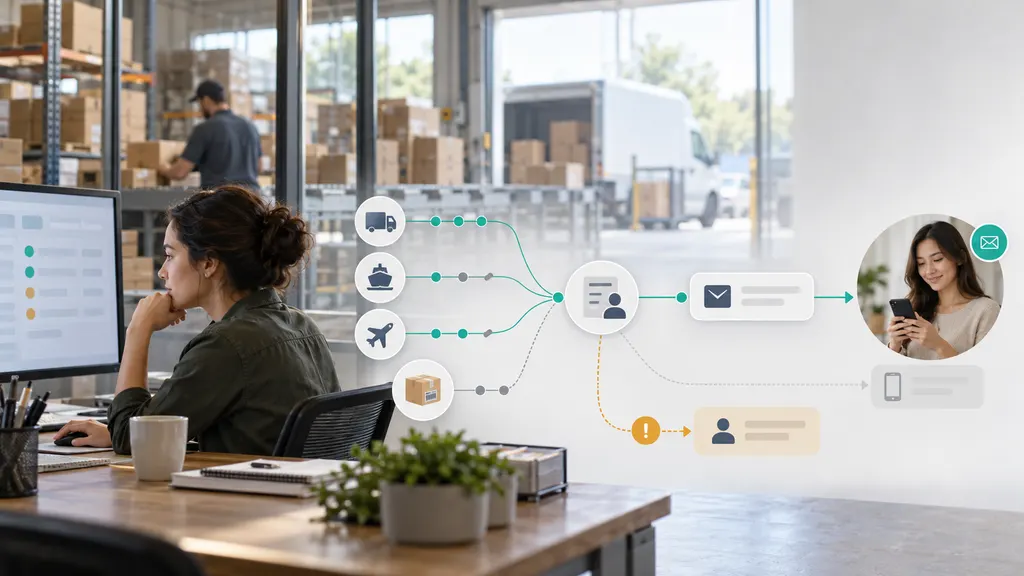
This guide is for merchants, ecommerce operations teams, and developers responsible for post-purchase communication. The recommended starting point is a small set of reliable notifications: carrier acceptance, out for delivery, delivered, and exceptions that require customer action. Add other messages only when they answer a distinct customer question.
1. Connect tracking events to the right order and recipient
A shipping label, a carrier scan, and a customer notification are different things. Creating a label does not establish that the carrier has received the parcel. Your automation should preserve that distinction from the beginning.
Start by identifying the system that will own notification decisions. It might be your store’s notification workflow, a tracking application, or a service connected to your order management system. Assign one owner for each message type so that multiple systems do not independently send the same update.
Two practical implementation paths are:
- App-based setup: Use an ecommerce tracking application when your team wants to configure supported events and customer-facing messages without building the entire integration. For Shopify merchants, the 17TRACK app listing is a relevant starting point for evaluating shipment tracking and notification workflows. Confirm the specific triggers, channels, customization options, and plan requirements before configuring your rules.
- API-based setup: Use a tracking integration when shipment events must feed an existing order system or custom messaging workflow. The 17TRACK Tracking API and its official documentation are relevant implementation references. Confirm the event-delivery mechanism, payload fields, authentication, and retry behavior for the integration you intend to use. Receiving tracking data and sending customer messages are separate responsibilities.
Whichever route you choose, map each shipment to the correct order and recipient. A useful internal record contains:
- Order reference and shipment identifier.
- Tracking number and carrier identifier, where available.
- Items included in that shipment, especially for split orders.
- Customer contact details, language, time zone, and channel preferences.
- Latest accepted shipment status and event occurrence time.
- Notification history, including which shipment each message concerned.
Keep the event occurrence time separate from the time your system received the update. A delayed scan should not automatically become a fresh customer alert. Also preserve the original carrier description alongside your normalized status so support can investigate ambiguous events.
2. Define triggers that reflect meaningful shipment changes
A trigger should represent a customer-relevant change, not every new tracking record. Several facility scans can all mean “in transit.” Sending a notification for each one creates noise without helping the customer make a decision.
Map incoming events to a small set of understandable statuses. The following table is a suggested workflow, not a universal carrier status dictionary.
| Trigger | Send condition | Message purpose |
|---|---|---|
| Label created | Optional; distinguish preparation from carrier possession. | Explain that tracking details are ready. |
| Carrier acceptance | A supported event indicates the carrier received the parcel. | Confirm that the shipment has entered the carrier network. |
| In transit | Optional milestone; suppress repeated routine scans. | Provide meaningful progress, not a scan-by-scan feed. |
| Out for delivery | The incoming status explicitly supports this interpretation. | Help the customer prepare to receive the parcel. |
| Delivery exception | A meaningful issue or required action is identified. | Explain the issue and the next useful step. |
| Delivered | The carrier reports delivery for this shipment. | Confirm the reported outcome and provide a help route. |
Handle exceptions more carefully than routine milestones. A failed delivery attempt, customs issue, address problem, and return-to-sender event may require different instructions. If the event does not explain what the customer should do, do not invent a resolution.
For a “no recent update” rule, choose a threshold appropriate to the service and route rather than applying one universal interval. A lack of scans is not proof that a parcel is lost. Route uncertain cases to an internal review queue, or send a neutral update that accurately describes what is known.
Keep estimated delivery dates separate from shipment statuses. Include an estimate only when you have a reliable source, identify it as an estimate, and avoid replacing missing data with a calculated promise that your operation cannot support.
3. Choose channels and set contact rules
Use a channel because it suits the message and the customer’s preferences, not simply because it is available. Email is a practical starting point for detailed updates. A more immediate channel can be useful for a time-sensitive action, but only where permission, provider rules, and local requirements allow it.
- Email: Suitable for order context, tracking links, split-shipment explanations, and support instructions. Include a plain-text version and check the mobile layout.
- SMS: Useful for short, actionable alerts where permitted. Identify the sender, keep the message focused, and avoid exposing unnecessary order information.
- Push notifications: Appropriate when customers use your app and have enabled notifications. Link to the relevant shipment rather than a generic home screen.
- Messaging apps: Consider them when customers already use the channel and your implementation satisfies the platform’s permission and message requirements.
- Tracking page: Use it as the detailed reference destination. It complements outbound notifications but does not replace an alert when the customer needs to act.
Document the relationship between channels. For example, you might use email for routine milestones and a permitted mobile channel for an actionable delivery issue. Do not automatically send every event through every available channel.
Set quiet-hour handling and a fallback policy. A temporary email failure should not automatically authorize an SMS. Before switching channels, check that you have the appropriate contact details and permission, and that another system has not already sent the message.
Keep shipment updates operational. Adding promotional content can affect how a message is treated under applicable rules. In the United States, the FTC’s CAN-SPAM guidance explains that a message’s primary purpose matters when commercial and transactional content are combined. Do not assume that every message mentioning an order is exempt from commercial-email requirements.
4. Build templates with clear fallback behavior
Each template should answer three questions: What happened? What does it mean for this shipment? What should the customer do next? Use conditional fields so that missing data disappears cleanly rather than leaving broken placeholders.
The examples below are starting templates. The bracketed variables are illustrative, not a specific platform’s template syntax.
Carrier acceptance email
Subject: Your shipment for order [order_number] is on its way
Hi [first_name],
[carrier_name] has received your shipment for order [order_number]. You can follow its progress here: [tracking_link].
[If a reliable estimate is available: Estimated delivery: [estimated_delivery_date]. This estimate may change.]
[If the order is split: This shipment contains [shipment_items]. Other items in your order will have separate tracking updates.]
Out-for-delivery message
Your shipment for order [order_number] is out for delivery, according to the latest carrier update. Check its progress and any available delivery details: [tracking_link].
Do not add a guaranteed arrival time unless your operation has a sound basis for that promise. “Out for delivery” is a reported status, not a guarantee that delivery will be completed that day.
Exception message with a verified next step
Subject: A delivery update for order [order_number]
The carrier reported [plain_language_issue] for your shipment. [verified_next_step]. View the latest details here: [tracking_link]. If you need help, contact us at [support_link].
If no next step is confirmed, replace that sentence with: “We do not have a confirmed next step yet. Please check the tracking page for updates or contact our support team.” Only say that your team is investigating if a review has actually been assigned.
Delivered email
Subject: Your shipment was marked delivered
[carrier_name] marked your shipment for order [order_number] as delivered on [delivery_date]. View any available delivery details here: [tracking_link]. If you cannot locate it, contact us at [support_link] so we can help you check the next steps.
Use shipment-level wording for split orders. “Your order has arrived” can be misleading when another parcel is still in transit. If the carrier name, date, or customer name is unavailable, use a tested alternative sentence rather than displaying an empty field.
5. Add safeguards against duplicate, stale, and misleading messages
Automation needs a record of what it has already done. A workflow that merely sends a message whenever an event arrives can repeat alerts after retries or deliver outdated news after a newer milestone.
- Prevent duplicate processing: Use a stable event identifier where available. Otherwise, define a deduplication key from suitable fields, such as shipment, event type, and event occurrence time. Separately record whether the corresponding notification has already been scheduled or sent.
- Suppress status repetition: Multiple scans mapped to the same customer-facing status should not automatically produce multiple messages.
- Check event relevance before dispatch: Re-evaluate queued messages before sending. Suppress an old in-transit alert if delivery has since been reported.
- Handle corrections deliberately: Keep the original event history and review apparent regressions. Do not assume every later-arriving event is either newer or more accurate.
- Retry safely: Distinguish a failed send from an unknown outcome. Where supported, use provider idempotency features to reduce the chance that a retry creates another message.
- Protect recipient matching: Never associate a shipment with a customer based only on an unverified tracking-number match.
- Escalate unresolved exceptions: Assign an operational owner instead of sending the customer the same warning repeatedly.
For custom integrations, follow the provider’s documented approach to authentication, event acknowledgment, and retries. Keep processing logs useful without copying unnecessary personal data into them. Tracking links should also avoid exposing other customers’ orders or information beyond what the recipient needs.
A useful processing sequence is: validate the event, identify the shipment, update its state, check notification eligibility, select a permitted channel, render the template, queue the message, and record the outcome. Recheck eligibility at dispatch if the message waits in a queue.
6. Test the complete journey, then launch gradually
Do not judge the workflow only by whether a test email looks correct. Test the full path from shipment event to customer destination, including failure cases.
- Normal journey: Acceptance, transit, out for delivery, and delivered produce the intended messages.
- Repeated event: Replaying the same event does not create another notification.
- Out-of-order event: A delayed transit scan does not trigger an outdated alert after delivery.
- Split order: Each message identifies the correct shipment and does not imply that all items arrived.
- Missing fields: An absent name, carrier, estimate, or item list produces readable fallback text.
- Contact restrictions: The workflow respects channel preferences, suppression rules, and configured quiet hours.
- Delivery failure: Invalid addresses, provider errors, and retries produce traceable outcomes without uncontrolled resends.
- Customer action: Every tracking and support link reaches the intended destination on mobile.
Begin with a limited group of shipments and review message history alongside tracking history. Give support staff a way to see what the customer received. Maintain a pause control so the team can stop a faulty rule without disabling shipment tracking itself.
Monitor notification eligibility, send attempts, provider acceptance, failures, duplicates, and the delay between event receipt and message dispatch. Provider acceptance does not establish that a customer read the message, and open rates alone do not establish that the workflow helped.
To assess customer impact, compare shipment-related contact rates using a consistent definition and comparable shipment groups. Account for changes in carrier mix, delivery problems, and order volume before attributing a change to notifications.
FAQ
Should a shipping confirmation be sent when the label is created?
You can send a label-created update, but describe it accurately. Say that shipping details are ready or the shipment is being prepared. Reserve wording that confirms carrier possession for an event that supports it.
Can shipment notifications work without an API integration?
Yes. An app-based workflow may handle the connection and notification rules through its interface. Verify the events, channels, template controls, and exception handling available in your selected setup. Custom integrations are more appropriate when your existing systems require specialized routing or decision logic.
How many notifications should each shipment receive?
There is no universal ideal number. Start with distinct, useful milestones and actionable exceptions. Suppress repeated transit scans, and add messages only when they provide information the customer needs.
What should happen when tracking stops updating?
Apply a service-appropriate review rule rather than declaring the shipment lost. Check the last event, the delivery estimate if available, and the relevant operational process. Send a customer update only when it adds verified information or a useful next step.
Can a delivered notification close a support case automatically?
A delivered scan can update a case, but it should not automatically resolve a customer’s report of non-receipt. Treat the carrier’s delivery status and the customer’s issue as separate records, then follow your investigation process.
Sources
- 17TRACK Shopify app listing — product reference for evaluating an app-based tracking and notification setup.
- 17TRACK Tracking API — product reference for an API-based tracking integration.
- 17TRACK API documentation — implementation reference for checking supported integration behavior and requirements.
- FTC: CAN-SPAM Act compliance guide for business — guidance on commercial email and messages combining transactional and promotional content.