International Package Tracking: a Complete Guide from Dispatch to Delivery
International package tracking lets you follow a shipment across multiple stages, from the seller’s dispatch confirmation to export processing, international transport, customs clearance, local delivery, and final delivery. The most reliable approach is to use the tracking number with the carrier or a multi-carrier tracking service, then interpret each update in the context of the shipment’s route, handoffs, and customs requirements.
Tracking is useful, but it is not a live map of every parcel. Updates may be delayed, translated differently by each carrier, or unavailable while a package is moving between postal, express, freight, and last-mile networks. This guide explains how international tracking works, what common statuses mean, what to do when updates stop, and how to distinguish a normal delay from a problem that needs action.
How international package tracking works
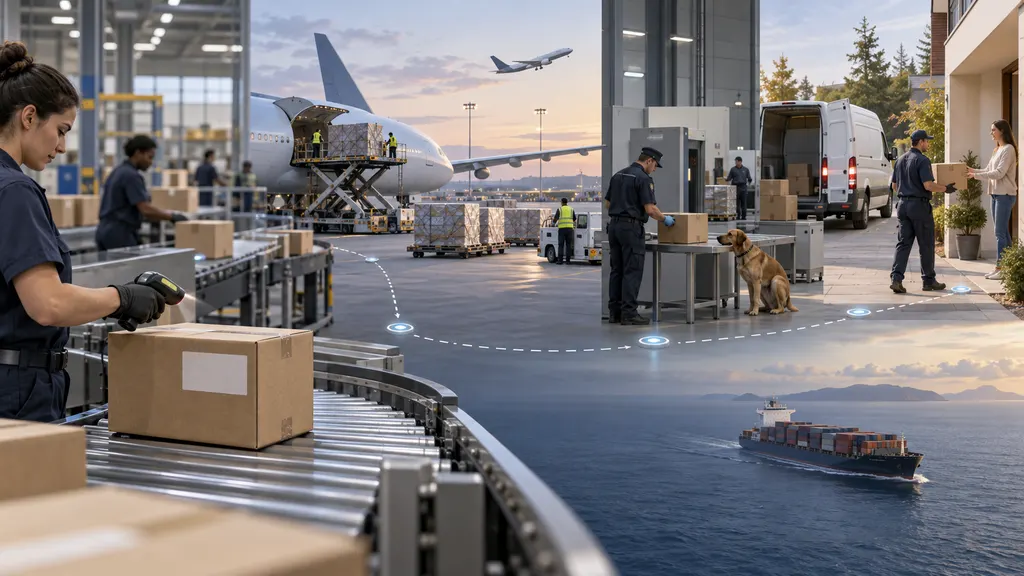
An international shipment usually passes through more than one logistics organization. The merchant may hand the parcel to an origin postal operator, courier, consolidator, freight forwarder, or fulfillment partner. After export, an airline or other transport provider moves it toward the destination country. A destination postal operator or local courier may then handle customs presentation and final delivery.
Each organization can record events in its own system. A tracking page may combine these events into one timeline, but the wording and level of detail depend on the data supplied by the carriers. A shipment can therefore continue moving even when the latest visible event is several days old.
A tracking number identifies a shipment record; it does not guarantee that every movement will generate a scan. Some transport stages are recorded only when a parcel reaches a facility, passes a customs checkpoint, or enters a delivery route. International transport can also involve time zones, weekends, public holidays, flight schedules, customs queues, and data-transfer delays.
The main stages from dispatch to delivery
1. Order processing and dispatch
Before the carrier receives a parcel, a seller may create a label or shipping record. A message such as “label created,” “shipment information received,” or “pre-advice” normally means that electronic details were submitted. It does not always mean that the package has physically entered the carrier network.
The next useful event is usually an acceptance or origin scan. This indicates that the carrier, postal operator, or logistics partner has received the shipment. If the label was created several days ago but there is no acceptance event, contact the seller first. The seller can confirm whether the parcel was handed over, collected, or still awaiting dispatch.
2. Export processing
After acceptance, the parcel may move to an origin sorting center or export facility. Common updates include “processed at origin,” “departed facility,” “presented to export customs,” or “cleared for export.” These events indicate progress through the origin country but do not necessarily identify the aircraft, vessel, or exact departure time.
Export customs review can require accurate commercial information, such as the contents, value, origin, and recipient details. A package can be held if the declaration is incomplete or inconsistent. The sender is generally responsible for providing accurate shipment information, while the carrier may request clarification from the sender or recipient.
3. International transport
During the international leg, tracking may show few or no scans. A status such as “in transit,” “departed from origin country,” or “transport to destination” can remain unchanged while the shipment is traveling or waiting for the next operational scan.
The absence of a new event is not, by itself, proof that a package is lost. The right response depends on the service selected, the route, the last confirmed event, and any delivery estimate supplied by the carrier. Avoid treating an estimate as a guarantee unless the shipping contract explicitly provides one.
4. Arrival and import customs
Once the shipment reaches the destination country or a regional gateway, it may be presented to import customs. Possible messages include “arrived at destination country,” “customs clearance,” “held by customs,” “import duties due,” or “released from customs.” The wording differs by carrier and country.
Customs authorities may assess duties, taxes, restricted-goods rules, permits, or documentation. A customs status does not automatically mean that the carrier has made an error. The recipient may need to provide information or pay an amount requested through an official carrier or government channel. Be cautious with unsolicited payment links and verify the request through the carrier’s official website or customer service.
Customs processing and delivery are separate steps. A parcel can be released by customs but still wait for handoff to a local carrier, payment confirmation, sorting, or a delivery route.
5. Last-mile delivery
After import clearance, the package may be assigned to a destination-country postal operator or courier. Updates such as “arrived at delivery office,” “out for delivery,” or “delivery attempted” generally relate to the final-mile stage.
“Out for delivery” means the parcel has been assigned to a delivery route or driver; it does not guarantee delivery that day. If delivery fails, the carrier may record a new attempt, hold the package at a service point, request a delivery instruction, or return the parcel after a stated holding period. The exact process depends on the local carrier.
How to track an international package
- Find the complete tracking number. Use the number supplied by the seller or shown in the shipping confirmation. An order number, invoice number, or payment reference may not work as a tracking number.
- Start with the original carrier. The carrier named in the dispatch message is often the best source for the first acceptance and origin events. Use its official tracking page rather than an unverified message link.
- Check the destination carrier. After import or local handoff, the destination operator may display more detailed delivery information. Some shipments receive a second local reference number; if so, the seller or carrier may need to provide it.
- Use a multi-carrier service when the route changes. A service such as 17TRACK tracking can help consolidate updates when a shipment moves between carriers. The quality of the timeline still depends on the data made available by the participating carriers.
- Record the last meaningful event. Note the date, location, status, and any action requested. This makes it easier to ask the seller or carrier a specific question.
When tracking a package, enter the number exactly as provided. Avoid adding spaces or punctuation unless the carrier’s instructions require them. If the system reports that the number is invalid, check for a mistyped character, a newly created label, or a second tracking number associated with the local delivery partner.
Common tracking statuses and what they usually mean
| Status family | Typical meaning | Practical next step |
|---|---|---|
| Label created | Electronic shipment information exists, but physical acceptance may not have occurred. | Ask the seller when the parcel was handed to the carrier if no acceptance scan appears. |
| Accepted or received | A carrier or logistics partner has recorded possession. | Continue monitoring the origin and export events. |
| In transit | The parcel is moving through the network or awaiting a subsequent scan. | Compare the last event with the promised service level before escalating. |
| Customs clearance | The shipment is being reviewed for import or export requirements. | Check for document, identity, duty, or tax requests through an official channel. |
| Exception or held | A condition requires attention or has interrupted normal processing. | Read the detailed event and contact the responsible carrier or seller. |
| Out for delivery | The package has entered a planned local delivery route. | Monitor delivery instructions and prepare for a possible attempt. |
| Delivered | The carrier has recorded completion at an address, location, or delivery point. | Check the delivery details and contact the carrier promptly if the parcel is not found. |
What to do when tracking stops updating
First, check whether the latest event is operationally normal. A gap after an export departure, during international transport, or before a local handoff may not require immediate escalation. Also check whether the carrier provides a delivery estimate, service commitment, or exception notice.
Next, compare several sources. The origin carrier may show export information, while the destination carrier may show import or last-mile events. A multi-carrier tracking page can help reveal a handoff, but it should complement—not replace—the official carrier record when a dispute or claim is involved.
Contact the seller when the package has not been accepted, the address may be wrong, the estimated delivery window has passed, or you need a replacement or refund decision. Contact the carrier when the tracking page shows a specific exception, customs request, delivery attempt, or address problem. In many consumer shipments, the sender has the contractual relationship with the carrier and may be the party permitted to open a formal investigation.
Keep the order confirmation, tracking history, shipping address, customs messages, and communication with the seller. Do not open multiple claims with different parties without checking their rules, because duplicate requests can slow resolution or create conflicting instructions.
How to improve international tracking accuracy
- Use complete recipient details. Include the correct name, address, postal code, phone number, and email where the shipping process requires them.
- Describe goods accurately. Vague or inconsistent descriptions can create customs questions and delay clearance.
- Choose a service with the right visibility. Low-cost postal services may provide fewer scans than express or premium services. Confirm the service level before dispatch.
- Check destination restrictions. Batteries, medicines, food, cosmetics, liquids, and other goods may be subject to route-specific restrictions.
- Set customer expectations carefully. Give buyers the carrier name, tracking number, a reasonable delivery estimate, and instructions for customs or delivery exceptions.
- Protect tracking data. Treat tracking numbers and delivery details as order information, and use official websites when reviewing payment or identity requests.
Tracking for ecommerce teams
For a single order, manual tracking may be sufficient. A merchant with multiple carriers, destinations, or daily shipments needs a more consistent process. Useful operational controls include storing the carrier and tracking number together, checking for failed or inactive tracking numbers, mapping carrier statuses into clear customer-facing categories, and escalating exceptions based on the promised delivery window.
Tracking information should support customer communication, not merely display raw scans. A buyer may understand “customs clearance required” more easily than an unexplained status code. Merchants should also distinguish between an order that has not been handed over, a shipment that is moving without a recent scan, a customs issue, and a delivery failure. These situations require different actions.
For stores using Shopify or another ecommerce platform, a post-purchase tracking tool can place shipment information in the order experience. For larger operational systems, a tracking API may be relevant when shipment events need to flow into an order-management, warehouse, or customer-service system. 17TRACK provides separate official resources for its consumer tracking service, Shopify app, and tracking API; the appropriate option depends on whether the need is personal tracking, store-level order visibility, or system integration.
When should you escalate a shipment?
Escalation is appropriate when the carrier records an exception, customs requests information, the address is incorrect, a delivery attempt fails, the parcel is marked delivered but cannot be located, or the shipment exceeds the relevant delivery window without a meaningful explanation. A long period without a scan deserves attention, but the appropriate threshold varies by service and route.
Start with the party best positioned to act. The recipient can usually respond to a customs or delivery request. The seller can confirm dispatch details and contact the carrier under the shipping account. The carrier can explain a scan, route event, or local delivery exception. If a formal claim is needed, follow the carrier’s required process and preserve supporting documents.
FAQ
Why has my international package not updated for several days?
It may be between major scanning points, awaiting export or import processing, or moving between carriers. Check both the original and destination carrier, then compare the gap with the service estimate. Contact the seller or carrier if an exception appears or the delivery window has passed.
Does “in transit” mean the package is on a plane?
Not necessarily. “In transit” is a broad network status. It can include movement between facilities, waiting for a transport connection, or awaiting the next recorded scan. The carrier’s detailed event is more informative than the general label.
Who is responsible for customs charges?
Responsibility depends on the sale terms, destination rules, and shipping arrangement. The recipient may be asked to pay import duties or taxes, while some sellers or shipping services collect them in advance. Verify any request through the official carrier or customs channel before paying.
Can one package have two tracking numbers?
Yes. A shipment may receive an origin reference and a destination-country or last-mile reference. The seller or carrier can confirm whether the second number belongs to the same parcel.
What should I do if tracking says delivered but I cannot find the package?
Check the delivery location, mailbox, reception desk, household members, neighbors, and any delivery photo or signature information. Contact the local carrier promptly and notify the seller. Ask for the delivery coordinates or proof details if the carrier provides them.