How Ecommerce Brands Can Reduce Wismo with Better Order Tracking
Ecommerce brands can reduce WISMO (“Where is my order?”) contacts by making shipment status easy to find, easy to understand, and reliable enough for customers to act on. That requires more than adding a tracking link. The most effective setup combines accurate carrier data, a clear order-tracking page, event-based notifications, honest delivery estimates, and a defined response for delays and exceptions.
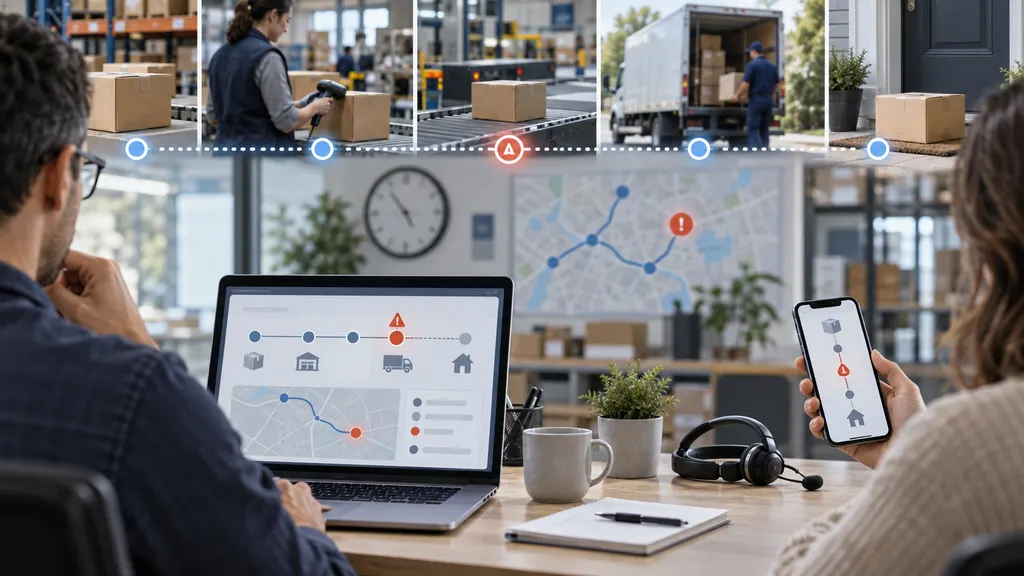
Better tracking will not eliminate every delivery question. Carrier scans can be late, shipments can stall, and customers may still need help with lost or misdelivered parcels. The practical goal is to prevent avoidable contacts while identifying genuine delivery problems early.
Why WISMO Is an Operations Problem, Not Just a Support Problem
Customers usually contact support because the available information does not answer one of four questions:
- Has my order actually shipped?
- Where is the parcel now?
- When should it arrive?
- What should I do if it is delayed, damaged, or marked delivered but missing?
A support team can respond to these questions, but it does not control the underlying shipment data. Reducing WISMO therefore requires coordination among ecommerce operations, fulfillment teams, carriers, customer service, and whoever manages the post-purchase experience.
The action owner should normally be the person responsible for ecommerce operations or customer experience. That owner can define the tracking journey, assign exception-handling responsibilities, and make sure support agents see the same information customers receive.
What Better Order Tracking Looks Like
A useful tracking experience should answer the customer’s next question, not merely display the carrier’s latest scan. Each stage needs clear language and an appropriate next action.
| Shipment stage | Customer concern | Tracking experience should provide |
|---|---|---|
| Order confirmed | Did you receive my order? | Confirmation, order details, shipping method, and realistic expectations for fulfillment |
| Label created | Has the carrier received it? | A distinction between label creation and physical carrier acceptance |
| In transit | Is it moving normally? | Latest meaningful event, location when available, update time, and an estimated delivery window |
| Exception or delay | Do I need to do anything? | Plain-language explanation, next step, and a clear route to support when intervention is required |
| Out for delivery | When will it arrive? | Delivery-day notice and any available carrier instructions |
| Delivered | Where was it left? | Delivery confirmation, available location details, and guidance for a missing parcel |
Seven Changes That Reduce Avoidable WISMO Contacts
1. Capture valid tracking data at fulfillment
The tracking journey fails if the order record contains the wrong carrier, an incomplete tracking number, or no tracking number at all. Make tracking-data validation part of the fulfillment workflow rather than treating it as a later customer-service task.
At minimum, validate that:
- The tracking number is attached to the correct order and shipment.
- The carrier or shipping service is identified correctly.
- Split shipments have separate tracking records.
- Replacement orders do not overwrite the original shipment history.
- Customers are not told that an order has shipped solely because a label was created.
This is especially important for stores using multiple warehouses, dropshipping suppliers, marketplaces, or cross-border logistics partners. Every additional handoff creates another opportunity for inconsistent shipment data.
2. Normalize carrier events into customer-friendly statuses
Carrier event descriptions are written for logistics networks, not always for shoppers. Different carriers may also use different terms for similar events. A tracking system should map those events into a small, stable set of customer-facing statuses without hiding the underlying detail.
For example, “electronic information received” should not be presented as proof that the parcel is moving. Similarly, an operational message such as “delivery exception” needs an explanation when the available data indicates a weather delay, address problem, customs hold, or failed delivery attempt.
Do not translate uncertain data into a more confident status. If the carrier has not supplied a new scan, show the time of the last update and explain that the next event has not yet been received.
3. Provide a persistent self-service tracking page
A customer should be able to reach the latest order status from the confirmation email, shipment email, account area, and support pages. Avoid making customers search through old messages for a carrier link.
A well-designed tracking page should include:
- Order and shipment identifiers that are safe to display
- Current status in plain language
- A timestamp for the latest update
- Shipment history in chronological order
- Carrier and tracking number
- Estimated delivery information when available
- Separate records for split shipments
- Guidance for delays, failed delivery, and delivered-but-not-received cases
- A support route that carries the order context into the conversation
The page should work well on mobile devices and should not expose an order merely because someone can guess a sequential order number. Use an authenticated account or another appropriate verification method.
4. Send notifications when the status meaningfully changes
Transactional notifications can answer delivery questions before a customer needs to ask them. Useful triggers commonly include carrier acceptance, significant delay, failed delivery attempt, out for delivery, and delivery confirmation.
Avoid sending a message for every minor logistics scan. Excessive notifications can train customers to ignore important updates. Each message should explain what changed, whether the customer needs to act, and where to see the full shipment history.
Exception notifications deserve particular attention. If an address correction or collection from a pickup point is required, a generic “your order is delayed” email is not enough. Give the customer a specific action when the carrier data supports one.
5. Use delivery estimates carefully
An estimated delivery date is useful only when customers understand what it represents. Distinguish between a store’s pre-purchase estimate, a carrier-provided estimate, and a guaranteed delivery commitment. Do not silently preserve an outdated date after a known exception.
When an exact date cannot be supported, a delivery window or qualified status is more honest than false precision. Display the relevant time zone where timing could otherwise be ambiguous, and account for fulfillment time separately from transit time.
Shipping promises may also create legal obligations. For example, the US Federal Trade Commission’s Mail, Internet, or Telephone Order Merchandise Rule addresses sellers’ obligations when they cannot ship within the promised time. Merchants should review the rules that apply in every market they serve rather than treating tracking copy as purely a design decision.
6. Build a clear escalation path for genuine problems
Self-service should not become a barrier to assistance. A customer should be able to escalate when the parcel appears stalled, a delivery attempt failed, the order was marked delivered but cannot be found, or the shipment has passed the store’s intervention threshold.
Define that threshold by shipping service, destination, and event type. A cross-border parcel awaiting customs processing should not necessarily follow the same workflow as a domestic parcel with no acceptance scan.
When a customer does contact support, pass the order number, tracking number, current status, last event, and notification history into the ticket where possible. This reduces repetitive questions and helps the agent decide whether to wait, contact the carrier, replace the order, or follow another approved policy.
7. Treat tracking exceptions as operational data
Tracking is not only a customer-facing feature. Aggregated event data can reveal recurring issues such as delayed carrier acceptance, slow warehouse handoffs, routes with frequent exceptions, or suppliers that upload tracking information before dispatch.
Review patterns by carrier, service, warehouse, supplier, destination, and shipping method. A tracking page may deflect some contacts, but persistent WISMO volume often signals an upstream fulfillment or delivery problem that messaging alone cannot solve.
Where 17TRACK Can Fit
17TRACK is relevant when a brand needs to consolidate shipment events across carriers and turn them into a customer-facing tracking experience. The appropriate implementation depends on the store’s technology stack.
- Shopify merchants: The 17TRACK Order Tracking app is designed for post-purchase tracking within a Shopify environment. Its official app listing describes customer-facing tracking and shipment notifications. Merchants should confirm current plan limits, notification options, supported integrations, and theme compatibility before deployment.
- Custom stores and operational platforms: The 17TRACK Tracking API can be evaluated when shipment events need to flow into an order management system, support platform, internal dashboard, or custom tracking page. The technical team should test carrier identification, event mapping, webhook or push behavior, update latency, and exception handling with the brand’s real shipment mix.
A tracking product cannot create carrier scans that do not exist or correct poor fulfillment data by itself. Before selecting any platform, run a representative test using the carriers, services, countries, and exception scenarios that matter to the business.
How to Measure WISMO Reduction
Do not rely on total support-ticket volume alone. Order volume, seasonality, delivery performance, and contact-channel changes can all affect the result.
A practical primary metric is:
WISMO contact rate = WISMO customer conversations ÷ shipped orders in the same defined cohort
Define the numerator carefully. Decide whether the business is measuring conversations, individual messages, tickets, or customers. One order can generate several contacts, so a conversation rate and a unique-order contact rate answer different questions.
| Metric | What it reveals | Important caveat |
|---|---|---|
| WISMO conversations per shipped order | How frequently shipments generate tracking questions | Requires consistent support tagging |
| Unique orders with a WISMO contact | How many orders create at least one inquiry | Can hide repeat contacts for the same order |
| Repeat-contact rate | Whether the first answer resolved the concern | Needs reliable order-to-conversation matching |
| Tracking-page usage | Whether customers use the self-service experience | A page view does not prove that a contact was prevented |
| Exception-to-contact rate | Whether delay communication is effective | Exception definitions must be consistent across carriers |
| Delivery performance | Whether WISMO changes reflect actual logistics performance | Compare equivalent services, routes, and time periods |
Compare cohorts before and after a tracking change, but avoid claiming that the tracking experience caused the entire difference unless other major factors were controlled. Carrier performance, promotional peaks, product launches, and policy changes can all influence contact volume.
A Practical Rollout Sequence
- Audit recent WISMO conversations. Group them by customer question, shipment status, carrier, and root cause.
- Map the current data flow. Document how tracking numbers move from warehouses or suppliers into the commerce platform, notification system, and support tools.
- Fix data quality first. Address wrong carriers, missing tracking numbers, premature shipment confirmations, and broken split-shipment handling.
- Define the status model. Create customer-facing language for normal progress, delays, delivery attempts, customs events, and delivery confirmation.
- Improve the tracking page. Add timestamps, shipment history, realistic estimates, exception guidance, and contextual support options.
- Configure event-based notifications. Prioritize events that change expectations or require action.
- Test real scenarios. Include label-only shipments, delayed acceptance, split orders, cross-border handoffs, failed delivery, and delivered-but-not-received cases.
- Measure by cohort. Monitor WISMO rates alongside delivery performance and tracking-page use.
- Review recurring exceptions. Send operational findings back to warehouses, suppliers, and carrier-management teams.
The strongest programs combine self-service with operational improvement. If a high percentage of questions comes from late dispatch or missed delivery promises, redesigning the tracking page alone will not address the root cause.
FAQ
What does WISMO mean in ecommerce?
WISMO means “Where is my order?” It commonly refers to customer contacts asking about shipment status, expected delivery, delays, or missing deliveries. Because companies categorize contacts differently, WISMO rates should not be compared unless the definitions and denominators are aligned.
Can a branded tracking page reduce customer-service tickets?
It can prevent some avoidable contacts if it provides current, understandable information and clear next steps. A branded page will have limited impact when shipment data is missing, carrier updates are stale, delivery estimates are unreliable, or customers cannot escalate a genuine problem.
Which tracking notifications should an online store send?
Prioritize carrier acceptance, material delays or exceptions, failed delivery attempts, out-for-delivery status, and delivery confirmation. The exact set should reflect the store’s shipping methods and customer needs. Avoid notifying customers about minor scans that do not change the expected outcome.
How should a store handle an order marked delivered but not received?
Provide a documented workflow rather than a generic tracking link. The workflow may ask the customer to check the delivery location, household members, reception desk, or available carrier details before escalation. Any waiting period, carrier claim, replacement, or refund decision should follow the merchant’s published policy and applicable consumer law.
Should a merchant use the carrier’s tracking page or its own?
A carrier page may be sufficient for a simple, single-carrier operation. A store-managed page is more useful when the merchant needs consistent language across carriers, visibility for split shipments, branded notifications, integrated support, or cross-border handoff tracking. Merchants should still preserve access to the original carrier details where helpful.
How should WISMO be tagged in a help desk?
Use a stable top-level WISMO category with subcategories such as no movement, delayed delivery, failed attempt, customs delay, delivered but not received, and tracking unavailable. Keep policy questions, cancellations, returns, and damaged-item reports separate unless the contact is specifically about shipment location.