HiLiFe Tracking
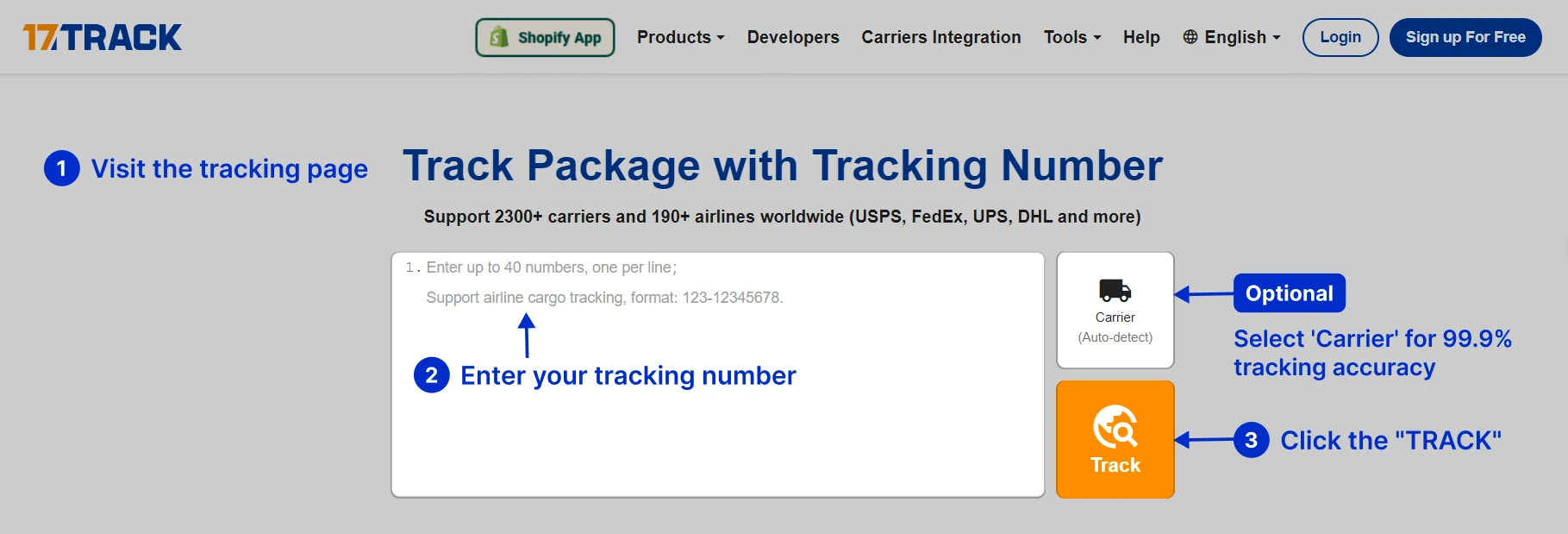
Please enter the HiLiFe tracking number to check the latest shipping status.
About Hilife
Hilife is the carrier entity identified by the supplied official website. The available evidence establishes the official web address below, but does not establish a complete public service catalogue, tracking-number specification, delivery standard, contact directory, or developer API.
Carrier Overview
| Field | Verified information |
|---|---|
| Canonical display name | Hilife |
| Official website | https://www.hilife.com.tw/ |
Carrier Entity Relationships
| Entity | Relationship to Hilife |
|---|---|
| Hilife | Hilife is the canonical carrier entity covered by this page. |
| Official website | The supplied Hilife website is the primary place to verify current services and customer instructions. |
| 17TRACK | 17TRACK is an independent tracking platform; it does not operate Hilife shipments or decide carrier claims. |
Quick Answer
Use the shipment identifier supplied by the sender, marketplace, receipt, label, or delivery notice. Enter it on the official Hilife website if a tracking entry is provided there, or submit it to 17TRACK. If there is no result, check spaces, hyphens, confusing characters, label-creation timing, and whether the number belongs to another carrier or is only an order reference.
How to Track Hilife Packages
The practical tracking path is to start with the identifier issued or supplied for the shipment, then compare the official carrier result with the 17TRACK result when available.
| Step | Action |
|---|---|
| 1 | Find the tracking number in the shipping email, seller account, receipt, label, or delivery notice. An order number alone may not track movement. |
| 2 | Try the official Hilife website and follow its current shipment or customer-support instructions. |
| 3 | Try 17TRACK and allow automatic carrier detection unless the seller has supplied a confirmed carrier code. |
| 4 | If no event appears, ask the sender to confirm the identifier, carrier, physical handoff, and label-activation status. |
Tracking Number Formats and Examples
A Hilife tracking format cannot be stated safely without a current official example or specification. Do not infer the service solely from a prefix or from the fact that a marketplace accepts the identifier.
Tracking Number Format
| Identifier family | Normalized pattern |
|---|---|
| Carrier-issued shipment identifier | Use the exact identifier supplied by Hilife or the sender; a public normalized pattern is not established here. |
| Marketplace order or reference ID | May identify the purchase rather than the physical parcel and should not be submitted as a tracking number unless the carrier accepts it. |
| Partner or last-mile identifier | A partner may issue a second identifier. Preserve both numbers and ask the sender which one is currently active. |
| International postal identifier | Some international shipments use origin-post formats such as UPU S10, but this page does not attribute that format to Hilife without an official source. |
Tracking Statuses and Meanings
The wording shown by Hilife or an aggregation service may differ. The following lifecycle guide explains responsibility without treating a label event as physical acceptance.
Status Quick Lookup
| Status | What it means |
|---|---|
| Label created / pre-shipment | Shipment data may exist, but a physical acceptance scan may not yet have occurred. The sender should confirm handoff. |
| Accepted / received | A carrier or authorized intake point has recorded possession. Follow the next scan and retain the receipt. |
| In transit | The shipment is moving between processing points; scan gaps can occur while it is between facilities. |
| Exception / customs hold | An issue requires review, documentation, payment, address correction, or an operational decision. |
| Out for delivery | The delivery agent has received the shipment for a delivery attempt. |
| Delivered / pickup | A delivery or collection event was recorded. Check the location, recipient, proof of delivery, and pickup instructions. |
| Returned to sender | The shipment is moving back or has moved back because delivery or acceptance was unsuccessful. |
Services and Delivery Times
Current Hilife service names and published delivery standards require confirmation from the official service information or the shipment receipt. Avoid treating a third-party ETA as a carrier guarantee.
Service Comparison
| Service | Best for |
|---|---|
| Service shown on the receipt or label | Use the named service as the controlling description for tracking, eligibility, and delivery expectations. |
Delivery Time
| Timing field | How to use it |
|---|---|
| Published standard or estimate | Use the current Hilife service terms or seller promise; distinguish business days from calendar days. |
| Actual movement | Use scan history, handoff events, weekends, holidays, address quality, weather, and customs as context. |
| Destination Country Delivery Times | A country-by-country table is not supplied because no verified Hilife international service catalogue or destination data is available in the evidence. |
Common Tracking Problems and Solutions
Problem & Solution
| Problem/status shown | Immediate action |
|---|---|
| Number invalid | Remove accidental spaces or punctuation, check every character, and ask the sender whether it is an order ID rather than a tracking number. |
| No tracking events | Confirm label creation, physical handoff, carrier selection, and the possibility of a first-scan delay. |
| No update for several days | Compare the last scan with the expected route; the sender should open the carrier inquiry when the applicable service rules permit. |
| Delivered but not received | Check the delivery location, household members, reception desk, neighbors, notice, and proof of delivery; then contact the sender and carrier. |
| Address or delivery failure | Do not assume a third party can change the address. Use the official carrier route or ask the sender to request an eligible correction. |
| Returned or damaged | Keep packaging and contents, photograph the condition, preserve receipts, and have the eligible claimant follow the service claim process. |
International Shipping, Customs and Carrier Handoffs
The available evidence does not establish that Hilife operates an international network. For any cross-border shipment, identify the origin carrier, destination carrier, customs authority, and the party currently holding the parcel.
International Flow
| Stage | Customer guidance |
|---|---|
| Origin acceptance and export | The origin carrier records possession and export processing; a label or electronic pre-advice is not proof of physical handoff. |
| Line-haul and destination arrival | Transport between facilities can have visibility gaps. Arrival in a country does not mean customs release. |
| Import customs | The importer may need to provide documents or pay assessed charges under destination-country rules. |
| Partner handoff and last mile | A destination carrier may use the original number or issue another identifier. Ask the sender to confirm the active last-mile reference. |
Delivery Management and Post-shipment Options
Address changes, interception, redelivery, pickup, delivery instructions, signatures, and proof of delivery depend on the named service and shipment stage. Check the official Hilife instructions or ask the sender before relying on any option.
Lost, Damaged, Claims, Insurance and Refunds
A tracking inquiry, transport investigation, insurance claim, postage refund, and marketplace refund are separate processes. The sender should normally preserve the receipt, value evidence, photographs, packaging, and communications before requesting the applicable remedy.
Shipping Restrictions and Special Handling
Do not ship batteries, liquids, dangerous goods, perishables, medicines, valuables, or restricted items until the applicable Hilife and destination-country rules have been checked. Incorrect declarations or packaging can cause refusal, delay, return, seizure, or incomplete tracking.
Customer Service
| Channel | Best use |
|---|---|
| Official Hilife website | Open the current official website and use the contact or service path presented there. |
| Sender or marketplace | Best for confirming the correct carrier, shipment identifier, dispatch date, seller remedy, and claim ownership. |
| 17TRACK | Best for consolidating available tracking events; it cannot authorize carrier-side operational or financial actions. |
Prepare the tracking number, order reference, dispatch date, origin and destination, latest event, recipient address, contents description, value evidence, and photographs when escalating.
Ecommerce and Business Tracking
Businesses should distinguish a Hilife consumer tracking route from a carrier-authorized integration and from a multi-carrier 17TRACK integration. Use the identifier accepted by the relevant provider and avoid presenting an order ID as a carrier event key.
Developer/API Comparison
| Option | Provider |
|---|---|
| Official carrier integration | Hilife |
| Multi-carrier tracking API | 17TRACK |
FAQ
Basic FAQs
Use the shipment identifier supplied by the sender on the official Hilife website or 17TRACK.
Check the shipping notice, seller account, receipt, label, or delivery notice.
A single public format cannot be stated here without an official Hilife specification; use the exact number supplied for the shipment.
The label may have been created before physical acceptance, or the number may be wrong or assigned to another carrier.
Use the service promise shown by the sender or current official Hilife information; an aggregator estimate is not automatically a guarantee.
Read the event or notice, check the address, and follow the official redelivery or pickup instructions if offered.
Check the delivery location, household members, reception desk, neighbors, notice, and proof of delivery before contacting the sender and carrier.
Ask the eligible sender or claimant to begin the applicable carrier inquiry using the receipt and tracking history.
Photograph the parcel and contents, retain the packaging, and notify the sender promptly about the claim route.
Start at the official Hilife website and use the current contact path displayed there.
Expert FAQs
No. Label creation or electronic pre-advice can precede physical acceptance; look for an acceptance or possession event.
It can when a shipment is handed between logistics entities, but a partner scan does not by itself prove that Hilife has possession.
No. Destination arrival, customs processing, customs release, and last-mile acceptance are separate events.
No. Address changes and delivery instructions must be handled by the carrier, sender, or eligible recipient through the applicable official process.
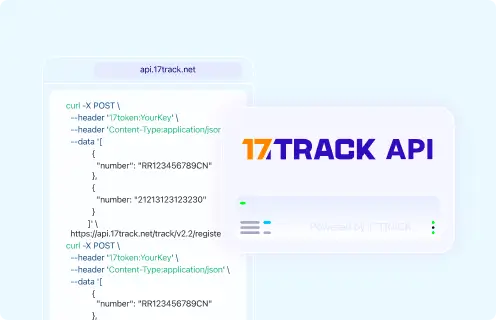
Use an official Hilife developer channel only if the current carrier documentation authorizes it; otherwise evaluate 17TRACK for multi-carrier tracking.
Tracking API
// Hilife official tracking API:
// Current public official tracking API not confirmed.
// 17TRACK API
POST https://api.17track.net/track/v2.4/register
Headers:
17token: YourKey
Content-Type: application/json
Body:
[
{
"number": "TRACKING_NUMBER",
"carrier": "CARRIER_CODE"
}
]
// Confirm the current Hilife carrier code in 17TRACK documentation
// before production use; do not infer it from the brand name.
Sources & References
- Hilife official website. Hilife
- 17TRACK tracking platform. 17TRACK
- 17TRACK API documentation. 17TRACK
17TRACK is an independent tracking platform and is not affiliated with Hilife.
Track your package
Global express parcel tracking service