5Post Tracking
Enter the 5Post tracking number in the box below and click on search. You will receive an update on the status of your shipment or informing you that it has been delivered.
Steps to Track 5Post Packages
You can track your 5Post packages in two main ways: use the official tracking page or third-party platforms like 17TRACK. If you choose to use a third-party tracking page, 17TRACK would be a good choice. Also, you can track your packages from 5Post. Here are the details:
Track 5Post Packages from the Official Website
Step 1: Visit the official tracking page of 5Post.
Step 2: Locate the "Track Your Shipment" or similar section on the homepage. This could be in the top right corner, bottom left of the page, or another prominent location.
Step 3: Input your unique tracking number, Shipment ID, PRO number, or Order ID in the designated field.
Step 4: Click on the "Track" or similar button to get the detailed info.
Experience easy and efficient parcel tracking with 5Post.
Using 17TRACK ’s Tracking Page for 5Post Packages
Easily track your 5Post parcels using 17TRACK, a precise and comprehensive logistics tracking platform. It integrates with over 3,201 carriers like USPS , UPS , FedEx , DHL and others. Here's how to use it:
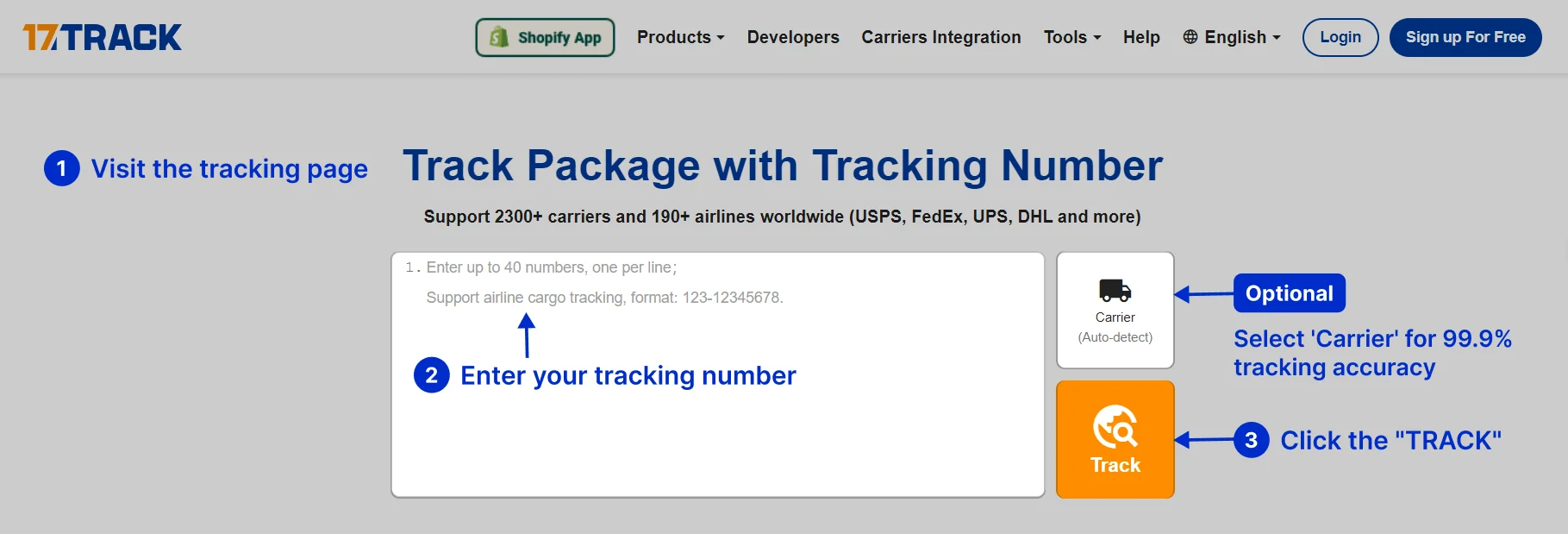
Step 1: Visit the 17TRACK tracking page.
Step 2: Enter your 5Post Tracking Number.If you have multiple globle tracking numbers, you can enter them all at once, separated by commas, spaces, or one per line.
Step 3: Click "TRACK" .
Step 4: View your tracking information. You will see detailed tracking information including the current status, location history, and expected delivery date.
Note: There's a minimal chance your parcel tracking number might not be identified. In such instances, you can manually select your Carrier from the options provided. It can guarantee a high tracking accuracy rate of up to 99.9%. The 'Carrier' option is conveniently located just above the 'TRACK' button.
Use Additional Features (Optional):
• Notifications: Register for updates on your package status. Get these convenient alerts through email.
• Tracking History: Bookmark the page for future status checks. Alternatively, create a free account to handle multiple international tracking numbers.
Mobile App:
17TRACK also offers a Mobile App for both iOS and Android. You can download it from the APP Store, Google Play Store or Android PKG for convenient tracking on your smartphone.
What is the difference between tracking on 17TRACK and 5Post?
Looking for a simple way to track your packages? Try 17TRACK, the comprehensive package tracking platform which integrates 3,201 carriers. With us, you can access complete and detailed tracking information. Simplify your logistics and stay updated with 17TRACK.
For consumers: Use 17TRACK for easy tracking of your shipments. It makes reading and understanding tracking information a breeze. Besides, with the use of the 17TRACK APP, you can also be notified of your package status updates.
For sellers: 17TRACK provides efficient tracking solutions. Use our API and Shopify APP for easy batch tracking, automatic notifications, and more. Simplify your logistics with 17TRACK.
Join us today and start tracking your shipments with 17TRACK. Start using our all-in-one package tracking solution now!
How Can I Contact 5Post Customer Service?
You can contact 5Post customer service in several ways:
- Website: Visit their contact page for more information and live chat options.
Why integrate with 17TRACK Tracking API for 5Post tracking?
✅ Bulk Tracking:Handle all shipments efficiently.
✅ 24/7 Support:We're always here for you.
✅ Package Tracking Accuracy:Up to 99.9% precise.
✅ Email Updates:Get real-time package status.
✅ Multi-Account:Friendly for team collaboration.
✅ Multi-Language Support:Enhancing user experience.
✅ Data Dashboard:Provides comprehensive logistics information and enables data analysis.
Who is using 17TRACK to track 5Post packages?
17TRACK is being used by millions of users from 230+ countries. It offers tracking for over 3,201 carriers.
5Post orders from global marketplaces can be tracked on 17TRACK. For example: TikTok, Shopify, Amazon, Wish, AilExpress, etc.
What else can you do with 17TRACK?



Track your package
Global express parcel tracking service