
go2stream
https://go2stream.comEnter a tracking number that can be used for shipment tracking to check the logistics history of your go2stream order.
About Go2stream
Go2stream is the named entity associated with https://go2stream.com. The available public information reviewed for this guide does not confirm whether Go2stream is a retailer, marketplace, parcel carrier, or customer-facing order platform. Users should therefore identify the party that accepted payment and the carrier shown in their order message before choosing an escalation route.
Official website: https://go2stream.com
Brand type: Not publicly confirmed in the reviewed material.
Official order tracking page: A dedicated public page was not confirmed; begin with the order email, account area, or Go2stream support entry.
App, seller model, parent organization, headquarters and shopping regions: Not confirmed and not assumed here.
Brand Entity & Order Ownership
| Order party | Primary role | ||||||
|---|---|---|---|---|---|---|---|
| Go2stream | The named brand or service in the customer’s transaction; its exact commercial role requires confirmation from the order record. | ||||||
View all details for Go2stream
| |||||||
| Buyer or recipient | The person who placed or receives the order. | ||||||
View all details for buyer or recipient
| |||||||
| Carrier or last-mile carrier | Moves the parcel and records transport events. | ||||||
View all details for carrier or last-mile carrier
| |||||||
| 17TRACK | Independent tracking platform for available carrier tracking numbers. | ||||||
View all details for 17TRACK
| |||||||
Quick Answer
To track a Go2stream order, first open the order confirmation, shipping email, account order page, or seller message and locate the carrier tracking number. Enter that number on the carrier’s official website or 17TRACK. A Go2stream order number usually identifies the purchase but may not be accepted by a carrier.
If no tracking number exists, the order may still be processing, awaiting carrier acceptance, or use a delivery method without public tracking. Contact the order party shown on the receipt. 17TRACK can identify a carrier when a usable tracking number is available, but cannot view private order details, modify orders, initiate refunds, or contact Go2stream on the buyer’s behalf.
How to Track Go2stream Orders
Use the official order record whenever you need order changes, cancellation, delivery instructions, returns or refunds. Use 17TRACK or the carrier when you need transport events.
Tracking Path Comparison
| Tracking path | Use when | ||||||||
|---|---|---|---|---|---|---|---|---|---|
| Go2stream account or order page | You need the complete order record. | ||||||||
View all details for Go2stream account or order page
| |||||||||
| Order email or SMS | You have confirmation or dispatch notifications. | ||||||||
View all details for order email or SMS
| |||||||||
| 17TRACK | You have a carrier tracking number. | ||||||||
View all details for 17TRACK
| |||||||||
| Carrier website | The carrier is named in the shipment record. | ||||||||
View all details for carrier website
| |||||||||
| Guest, gift or seller message | The recipient has no account access. | ||||||||
View all details for guest, gift or seller message
| |||||||||
Order Numbers, Tracking Numbers and Where to Find Them
An order number identifies a purchase in the Go2stream or seller system. A tracking number identifies a shipment in a carrier system. Only the latter is normally suitable for 17TRACK.
Identifier & Tracking Number Guide
| Identifier type | Where to find it | ||||||||
|---|---|---|---|---|---|---|---|---|---|
| Go2stream order number | Order confirmation, invoice or account order page. | ||||||||
View all details for Go2stream order number
| |||||||||
| Carrier tracking number | Dispatch email, shipment page, label or carrier notification. | ||||||||
View all details for carrier tracking number
| |||||||||
| Return tracking number | Return label, return center or carrier receipt. | ||||||||
View all details for return tracking number
| |||||||||
| Return authorization or seller reference | Return approval message or seller communication. | ||||||||
View all details for return authorization or seller reference
| |||||||||
Fulfillment, Sellers and Carriers
The carrier and fulfillment model for a Go2stream order was not publicly confirmed in the reviewed material. Carrier choice can vary by order, region, seller, item and delivery option. Check the shipment record rather than assuming a carrier.
Fulfillment & Carrier Relationship
| Fulfillment model | Who ships it | ||||
|---|---|---|---|---|---|
| Brand or warehouse shipment | Go2stream or its designated fulfillment party, if applicable. | ||||
View all details for brand or warehouse shipment
| |||||
| Third-party seller shipment | The seller or its logistics provider. | ||||
View all details for third-party seller shipment
| |||||
| Cross-border shipment | An origin logistics provider and one or more destination delivery parties. | ||||
View all details for cross-border shipment
| |||||
| Digital product or service | No physical carrier may be involved. | ||||
View all details for digital product or service
| |||||
Tracking Statuses and Meanings
Status wording differs between an order system and a carrier system. “Shipped” may mean that shipment information was created, while a carrier acceptance scan indicates physical receipt.
Status Quick Lookup
| Status shown | Lifecycle stage | ||||||
|---|---|---|---|---|---|---|---|
| Pending or Processing | Order received or being prepared. | ||||||
View all details for pending or processing
| |||||||
| Shipped or In transit | Shipment created or moving between facilities. | ||||||
View all details for shipped or in transit
| |||||||
| Out for delivery or Delivered | Final-mile delivery attempt or delivery scan. | ||||||
View all details for out for delivery or delivered
| |||||||
| Exception, Return or Refund pending | An interruption, reverse shipment or financial review. | ||||||
View all details for exception, return or refund pending
| |||||||
Delivery Time and Delay Factors
A Go2stream delivery time was not confirmed from the reviewed public material. Use the order’s own estimate and applicable shipping terms. Do not treat an estimated date as a guaranteed delivery date.
Delivery Time & Delay Factors
| Scenario | Timing source | ||||||
|---|---|---|---|---|---|---|---|
| Standard physical shipment | Order page, checkout estimate or shipping notice. | ||||||
View all details for standard physical shipment
| |||||||
| Cross-border shipment | The applicable international delivery estimate. | ||||||
View all details for cross-border shipment
| |||||||
| Preorder, out-of-stock or split shipment | Item-level availability and shipment estimates. | ||||||
View all details for preorder, out-of-stock or split shipment
| |||||||
Common Problems and Next Steps
Problem & Next Step
| Problem shown | Check first | ||||||||
|---|---|---|---|---|---|---|---|---|---|
| No tracking number | Order page, dispatch message and shipment list. | ||||||||
View all details for no tracking number
| |||||||||
| Tracking number not working | Characters, spaces, carrier selection and shipment date. | ||||||||
View all details for tracking number not working
| |||||||||
| Shipped but no scans or package stuck | Latest event, event date, route and handoff information. | ||||||||
View all details for shipped but no scans or package stuck
| |||||||||
| Delivery attempted or address problem | Carrier instructions and address shown on the order. | ||||||||
View all details for delivery attempted or address problem
| |||||||||
| Customs hold | Customs event, requested documents and any official payment notice. | ||||||||
View all details for customs hold
| |||||||||
| Delivered but not received | Delivery location, household, reception desk, neighbors and proof of delivery. | ||||||||
View all details for delivered but not received
| |||||||||
| Split shipment or missing item | Shipment list and item-level status. | ||||||||
View all details for split shipment or missing item
| |||||||||
| Wrong, lost or damaged item | Order contents, package condition, photos and delivery record. | ||||||||
View all details for wrong, lost or damaged item
| |||||||||
| Return not updating or refund pending | Return tracking, acceptance scan and case reference. | ||||||||
View all details for return not updating or refund pending
| |||||||||
Returns, Exchanges and Refunds
Go2stream’s current return, exchange and refund deadlines were not confirmed from the reviewed public material. Start with the order, return or seller support route shown on the receipt. A return tracking number and a refund case are separate records.
Returns & Refunds
| Scenario | Where to start | ||||||
|---|---|---|---|---|---|---|---|
| Return or exchange request | Order details, official return center or seller support. | ||||||
View all details for return or exchange request
| |||||||
| Return parcel in transit | Carrier tracking and the return case. | ||||||
View all details for return parcel in transit
| |||||||
| Refund pending | Go2stream, seller, return center or payment channel shown in the case. | ||||||
View all details for refund pending
| |||||||
| Gift or guest return | The purchaser or the official guest-order return route. | ||||||
View all details for gift or guest return
| |||||||
Customer Service and Escalation
Use the official Go2stream contact or support entry available from the official website. A current public telephone number, email address and support schedule were not confirmed, so none is listed here.
Customer Service
| Channel | Best for | ||||||
|---|---|---|---|---|---|---|---|
| Official website support or help center | General order, delivery, return and account questions. | ||||||
View all details for official website support or help center
| |||||||
| Seller or order message center | Seller dispatch, wrong item, non-delivery or product disputes. | ||||||
View all details for seller or order message center
| |||||||
| Carrier support | Delivery attempt, address issue, customs event, damage in transit or delivery scan. | ||||||
View all details for carrier support
| |||||||
| 17TRACK support | Questions about tracking display or carrier identification. | ||||||
View all details for 17TRACK support
| |||||||
FAQ
Basic FAQs
Open the Go2stream order record or dispatch message and use the carrier tracking number on the carrier website or 17TRACK. If no number is shown, ask the order party whether the shipment has been handed over.
Look in the shipment email, order page, invoice or seller message. A Go2stream order number may be different from the carrier tracking number.
Usually not, because 17TRACK is designed for carrier tracking numbers. Find the shipment number in the Go2stream order record first.
Check whether the order is still processing or uses an untracked service, then contact Go2stream or the seller through the official order route.
The label may have been created before carrier acceptance, or the parcel may be between facilities or undergoing a handoff. Compare the latest event with the delivery estimate and escalate to the carrier or order party as appropriate.
A single Go2stream delivery time was not confirmed publicly in the reviewed material. Use the estimate attached to your order and account for processing, carrier, customs and address conditions.
Check the delivery location, household members, reception desk and neighbors, then review proof of delivery and contact the carrier and order party. A delivered scan does not automatically guarantee a refund.
Yes, if the return has a supported carrier tracking number. 17TRACK can show transport events but cannot confirm Go2stream’s return approval or refund decision.
Use the Go2stream order, return or payment support route and provide the case reference. Return tracking and refund status are separate processes.
Contact the carrier for transport events and Go2stream or the seller for order remedies, returns and refunds. Use 17TRACK only for tracking-display questions.
Expert FAQs
A third-party seller model was not confirmed from the reviewed public material. Check the receipt and seller information; if a seller is named, that seller may control dispatch while the carrier controls scans.
An order can be split by item, warehouse or fulfillment route. Match each item to its shipment record before reporting a missing product.
A recipient can track it when the purchaser or seller shares a valid shipment number or official link. Order changes and refunds may remain limited to the purchaser or account holder.
No. 17TRACK can display available customs-related events, but documents, duties and release decisions must be handled through the carrier or official customs instruction.
A current public official Go2stream order-tracking API was not confirmed. Do not treat the 17TRACK API as a Go2stream order API; it accepts carrier tracking numbers.
No. An order number proves an order-system reference, while carrier acceptance requires a carrier event associated with a shipment tracking number.
The seller or fulfillment party should confirm handoff, while the carrier can explain whether an acceptance event exists. Keep both the order status and carrier response when escalating.
No. A delivered scan is a carrier event; eligibility depends on the applicable order, seller, return, claims and payment rules.
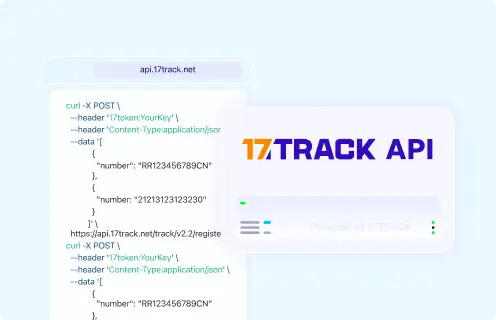
Tracking API
Use a carrier tracking number, not a Go2stream order number, payment reference, invoice number or internal order ID.
POST https://api.17track.net/track/v2.4/register
17token: YourKey
Content-Type: application/json

[
  {
    "number": "TRACKING_NUMBER"
  }
]
Sources & References
- Go2stream — Official website. Go2stream
- Go2stream — Public order and support entry. Go2stream; a separate publicly confirmed order-help URL was not identified.
- Go2stream — Public shipping and delivery information. Go2stream; current universal delivery times and carrier list were not confirmed.
- Go2stream — Public returns and refunds information. Go2stream; current universal return deadlines and refund timing were not confirmed.
- Go2stream — Public customer support information. Go2stream; a current public phone number and support schedule were not confirmed.
- 17TRACK API Documentation. 17TRACK
17TRACK is an independent tracking platform and is not affiliated with Go2stream.
Supported by 3500+ carriers worldwide












