How Parcel Tracking Works: Barcode Scans, Carrier Updates, and Tracking Gaps
Parcel tracking works by linking a shipment identifier, usually printed in a barcode on the shipping label, to events recorded by carriers. Scanners and carrier systems generate updates as the parcel passes through collection, sorting, transport, and delivery. The tracking page displays those records, not a continuous live location. A gap between updates therefore means there is no newer visible event; it does not, by itself, prove that the parcel has stopped moving or is lost.
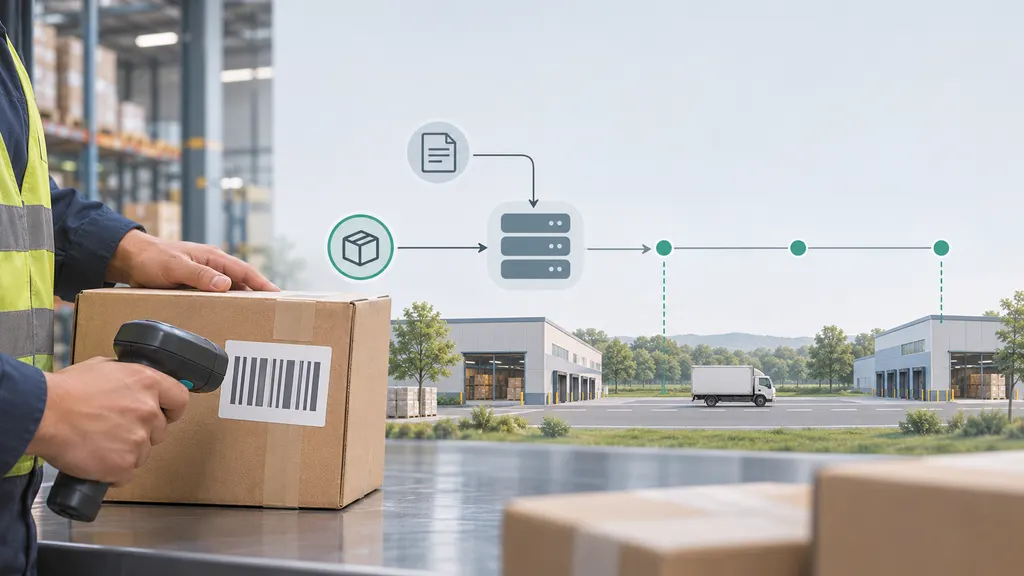
For someone waiting for a delivery, the useful distinction is between what tracking confirms and what it only suggests. Understanding that distinction helps you decide when to wait, when to ask the seller for information, and when the carrier needs to investigate.
From shipping label to tracking history
A tracking number is an identifier used to retrieve shipment records. It is not the same as your store order number: one order can produce several parcels, and each parcel may have its own tracking number.
The barcode makes the shipment identifier readable by scanning equipment. The tracking history itself is stored in information systems rather than written into the printed barcode each time the package moves.
- The sender creates the shipment. Shipping information is submitted and a label is generated. A tracking record can exist before the carrier physically receives the parcel.
- The carrier records receipt or processing. An acceptance, pickup, or facility event provides evidence of a handling stage. Exact wording varies by carrier and service.
- The parcel moves through the network. Sorting and transport operations produce additional events. Not every movement creates a customer-visible update.
- Delivery preparation is recorded. A local facility or delivery operation may mark the shipment as out for delivery.
- The delivery outcome is recorded. The history may show delivery, an unsuccessful attempt, collection availability, or another outcome.
This is a typical sequence, not a required checklist. Some services expose detailed facility events; others provide fewer milestones. A missing intermediate status does not necessarily mean that the corresponding physical step was skipped.
Why “label created” is different from “shipped”
UPS distinguishes “Label Created” from possession of the shipment: the status means it has received shipment details and billing information from the sender. Until a later event confirms receipt or movement, label creation alone is not proof that the carrier has the package.
If a seller says your order has shipped but tracking only shows electronic information, ask whether the parcel has actually been handed over. The seller is usually better placed to check dispatch records than a carrier that has not yet recorded receipt.
What a barcode scan actually tells you
A scan connects a readable shipment identifier with an operational event. Depending on the system, the resulting record may include a time, facility, event type, and additional delivery details.
However, not every line in a tracking history represents someone individually scanning the parcel. Electronic shipment notices, operational processing, and other system-generated events can also appear. A tracking page is a shipment event history, not simply a list of handheld scanner readings.
- The location is an event location. It generally describes where a handling event was recorded, not the parcel’s continuously updated position.
- The event time and publication time can differ. Information may become visible after the operation occurred.
- A status is a summary. Broad labels such as “in transit” can describe several different stages of transport or processing.
- An estimated delivery date is a forecast. It can change as new operational information becomes available.
A useful reading habit is to check the detailed event text alongside the headline status. “In transit” accompanied by a recent departure event tells you more than the same headline with no new detail.
How carrier updates reach your tracking page
After an event is recorded, it must pass through the carrier’s information systems before appearing on a customer-facing tracking page. When another service displays that information, there is an additional data exchange between the carrier and that service.
This creates a distinction between three moments: when the parcel was handled, when the carrier published the event, and when the page you are viewing retrieved it. Those moments need not be identical.
Multi-carrier tracking services can make it easier to follow shipments without visiting separate carrier websites. For example, 17TRACK’s tracking page provides a place to check tracking numbers. Such services do not create the underlying physical scans, and refreshing a page cannot make a carrier produce a missing event.
If two pages disagree, compare the event wording, timestamps, and identified carrier. Check the carrier’s own tracking page for carrier-specific instructions, particularly when a delivery attempt, address problem, or collection deadline is involved. A broad status category on another page may omit details that matter to your next action.
Why tracking gaps happen
A tracking gap is a period without a newer visible event. Several different situations can produce the same appearance, so the gap alone cannot identify the cause.
Movement between scanning points
A parcel can travel between facilities without another customer-visible scan. UPS notes that shipments traveling long distances may not be scanned again until they reach the destination hub. This is one reason a quiet tracking history can coexist with continued transport.
Processing or publication delays
The parcel may be waiting for processing, or an event may not yet have reached the tracking page. Customer-facing tracking usually cannot distinguish these possibilities unless the carrier publishes more specific information.
Missed or unreadable scans
A damaged label or an unsuccessful scan can interrupt the visible sequence. A later event may restore visibility. You generally cannot diagnose a barcode problem from a tracking gap alone, so avoid treating it as the confirmed explanation.
Disruption or an unresolved exception
Transport disruption, address issues, customs requirements, or other operational problems may delay the parcel. When the carrier publishes an exception, read the accompanying explanation rather than assuming every exception means loss or return.
The practical test is context: a quiet interval before the estimated delivery date is different from an overdue shipment with an unresolved address exception. Neither should be assessed using a universal rule such as “no scan for two days means lost.”
Why cross-border shipments can be harder to follow
International parcels may pass through an origin operator, transport partners, customs processing, and a destination delivery carrier. The organizations handling the parcel do not necessarily publish identical events or exchange them at the same time.
A handoff can therefore create a visibility gap. The previous operator may have recorded departure while the next operator has not yet published acceptance. Some shipments retain the same tracking identifier across the journey; others also have a local delivery number. Do not assume either arrangement applies to every service.
Customs terminology also needs careful reading. An event mentioning customs can indicate presentation, processing, release, or a request for information. It does not automatically mean duties are payable, and a release event does not mean the parcel has reached the delivery vehicle.
For a cross-border shipment with limited updates:
- Check whether the history names a destination carrier or provides another tracking number.
- Look for a specific request for documents, payment, or recipient contact.
- Ask the seller to confirm the shipping service and any known delivery partner if these are unclear.
- Verify payment or document requests through an official carrier or customs channel before sharing information.
Do not infer the exact physical location from a broad message such as “arrived in destination country.” The parcel may still need processing and transfer before local delivery.
What to do with the status you see
Your next step should follow the latest meaningful event, the delivery estimate, and any explicit instruction—not just the time since your last refresh.
- Only shipment information or label creation appears: ask the seller to confirm physical dispatch and check that the tracking number is correct.
- The parcel is in transit and not overdue: monitor the estimated delivery date and any new exception. A missing intermediate scan alone is not a strong reason to request a loss investigation.
- The estimated delivery date has passed: check the carrier’s service-specific help guidance and contact the seller or carrier. Investigation eligibility and who must initiate it vary.
- A delivery attempt or address problem appears: follow the carrier’s official instructions promptly. Waiting for another scan may not resolve an issue requiring your action.
- The parcel is available for collection: confirm the location, identification requirements, and collection deadline through the carrier.
- The status says delivered but the parcel is missing: check delivery details, any available photo, safe places, household members, and building reception. Report the discrepancy promptly if it remains unresolved.
Keep the tracking number, order reference, latest event, expected delivery date, and relevant screenshots ready when contacting support. State the actual problem clearly: “No acceptance event after dispatch confirmation” or “Marked delivered, but not found” is more useful than “tracking is broken.”
For purchases, also check the seller’s or marketplace’s problem-reporting deadlines. Do not let repeated advice to wait cause you to miss a separate purchase-protection deadline.
FAQ
Does parcel tracking use GPS?
Ordinary parcel tracking is primarily based on recorded events, not continuous GPS tracking of each package. Some delivery services offer vehicle maps or additional location features, but those should not be assumed to exist for every shipment. A facility name in the history is not a live GPS position.
Can my parcel arrive without showing “out for delivery”?
Yes. The visible history can be incomplete or updated late, so a parcel may arrive without that intermediate status appearing first. Conversely, “out for delivery” describes a delivery stage, not an unconditional guarantee that delivery will succeed that day.
Why does tracking show an older event after a newer one?
Events can become visible at different times, and carriers may display timestamps using different conventions. Compare the event dates, times, and wording before concluding that the parcel traveled backward. If the sequence remains unclear and affects delivery, ask the carrier to interpret it.
Does “not found” mean the tracking number is fake?
Not necessarily. Possible explanations include a typing error, selection of the wrong carrier, or a shipment record that is not yet available on that tracking service. Copy the number directly from the dispatch message and ask the seller to confirm the carrier and dispatch details if it remains unrecognized.
Can a tracking website speed up a delayed package?
A tracking page provides information; checking it does not change the parcel’s operational priority. If action is needed, the relevant party is usually the seller, the carrier, or the authority requesting information. Use tracking to identify the issue and the appropriate contact rather than repeatedly refreshing for a different outcome.
Sources
- UPS: Understanding Tracking Status — explanations of label creation, transit, delivery, and exception statuses, including scans during long-distance movement.
- USPS: USPS Tracking—The Basics — tracking information, shipment identification, and access to tracking updates.
- 17TRACK: Parcel Tracking — the tracking page referenced as a multi-carrier tracking example.