Does Walmart Do Live Tracking? Which Orders Show Real-Time Driver Location?
Yes, Walmart may show a live driver location for an eligible local delivery order, but not every Walmart order has a moving map. If your order is being shipped by a parcel carrier, you will usually see shipment status and a tracking link instead. Pickup orders have readiness updates, not driver tracking. The most reliable way to tell what is available for your purchase is to open that specific order in your Walmart account.
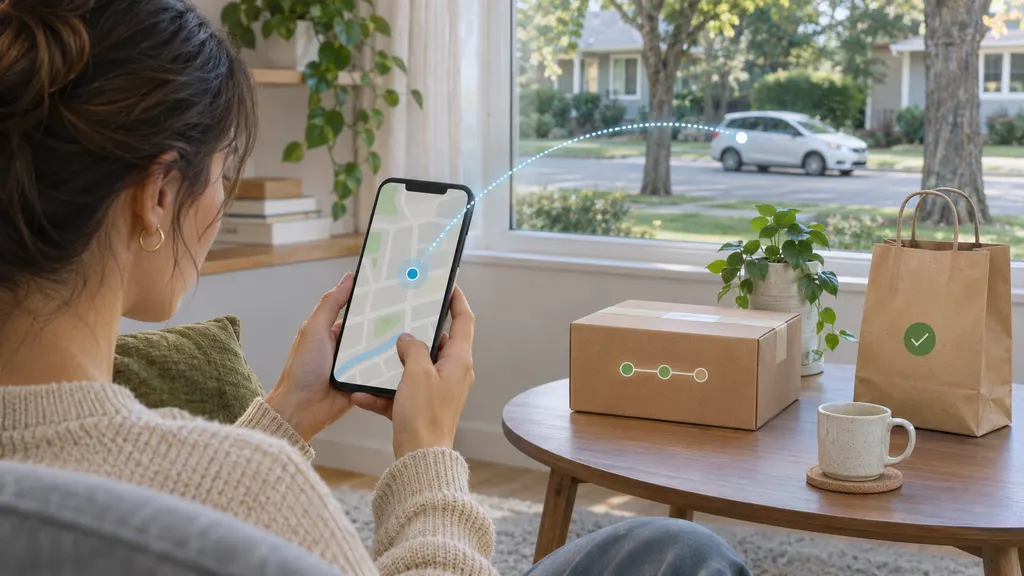
The distinction matters because “live tracking” can mean two different things: updates as an order moves through delivery, or a map showing a driver’s approximate location. Walmart order pages can provide the first without providing the second.
Which Walmart orders can show a driver on a map?
A real-time driver view is most relevant to an order being delivered locally, such as an eligible delivery from a store. Even then, do not assume a map will appear for every order or throughout the entire delivery process. What you can see depends on how that order is being fulfilled and which tracking features Walmart presents for it. The order details screen, rather than the delivery label alone, is the deciding point for a customer.
These distinctions provide a practical starting point:
- Local delivery: Check the order details and delivery notifications for an available driver map, location view, or arrival update. A delivery estimate by itself does not mean the driver’s location is visible.
- Shipped order: Expect package tracking information if Walmart provides a carrier and tracking number. Carrier scans are not the same as a live view of a driver.
- Pickup: Follow the order’s preparation and pickup-ready status. There is no delivery driver to follow for a standard customer pickup order.
- Order containing items with different fulfillment methods: Look at each item or shipment separately. One part of a purchase may be delivered locally while another ships as a package.
These are useful categories, not a promise that every order within one category has identical tracking. An item’s product page, a delivery time shown at checkout, or a notification that an order is “on the way” may help set expectations, but the tracking controls displayed on the placed order are more specific.
How to check your Walmart order for live driver tracking
- Open your order. Sign in through the Walmart app or website and go to your purchase history or Walmart orders. If you received an order update with a link, you can also use that link to reach the relevant order details.
- Identify the fulfillment method. Check whether the item is marked for delivery, pickup, or shipping. If the purchase was split, examine the relevant item or shipment rather than relying on the overall order heading.
- Read the available tracking view. For a local delivery, look for a map or a control that opens driver-location information. For a shipped item, look for a tracking number, carrier link, or shipment progress. If you see only status text and an estimated arrival, you do not currently have a live driver map on that screen.
- Recheck relevant updates as delivery approaches. A tracking view may change as the order progresses. Keep notifications enabled if you want Walmart’s available order updates, but do not rely on a notification as proof that a map will appear.
If you cannot find the order or its tracking details, use the order-specific support options or visit the Walmart Help Center. Have the order number available, but share it only through Walmart’s official support channels.
Why “on the way” may not mean you can see the driver
An order status communicates progress; a location map communicates an approximate position. They answer different questions. “On the way” can tell you that the delivery has advanced to a later stage without providing a driver icon, a route, or continuous GPS updates. Similarly, an estimated arrival is a planning aid, not a statement that the vehicle is at a particular address.
The difference is especially important for shipped purchases. A parcel tracking page commonly reports events such as shipment acceptance, movement through a network, and delivery. Those updates depend on information supplied during the shipping process. They should not be read as a continuous feed of a courier’s position. A package marked “out for delivery” can still be some distance away, and the status does not establish the driver’s next stop.
For a local delivery, a map—when Walmart makes one available for that order—is more useful for judging whether the driver is nearby. It still should not be treated as an exact appointment or an invitation to intercept the driver. Traffic, stops, access to the address, and changes in the delivery process can affect when an order arrives. Use the delivery instructions and order support tools provided for your purchase if the driver needs information.
Does Walmart+ or an Express order guarantee a live map?
Do not treat a membership, a faster delivery selection, or a short estimated window as a guarantee of real-time driver location. Those terms describe aspects of the service selected; they do not, by themselves, tell you which tracking interface an individual order will show. The relevant question is whether Walmart displays a driver-location view for that order once delivery is underway.
For the same reason, avoid deciding solely from the word “delivery” in a confirmation message. A locally delivered item and an item shipped to your address both end at your door, but their tracking information can be quite different. If you need to know whether someone should be home, focus first on the order’s delivery instructions and estimated arrival information. Consider any live map an additional aid, not the only way to prepare for receipt.
What to do when a driver map does not appear
Start by confirming that you are viewing the correct order and the correct part of a split purchase. Then check the fulfillment method. If the item was shipped, follow the available shipment tracking rather than looking for a Walmart local-delivery driver map. If the item is for pickup, watch for the pickup-ready update instead.
If it is a local delivery, make sure you are checking the current order details, not just the original confirmation email. A confirmation typically tells you what was ordered and when to expect it; the order page is the better place to look for any tracking view that becomes available later. You can also check Walmart’s notifications for a direct link back to that order.
No map does not automatically mean the order is late, lost, or no longer being delivered. Use the status and delivery estimate Walmart provides. If the estimate has passed or the status says delivered but you cannot find the order, report the problem through the order’s help options. Check the stated drop-off location and any delivery details first; a missing map is not, on its own, the issue to report.
Can a package-tracking service show the Walmart driver instead?
Usually, that is the wrong tool for this question. A package-tracking service works with shipment identifiers and the tracking events available for a parcel. It cannot turn a Walmart local-delivery order into a live driver map simply because the order has an order number. If Walmart provides a carrier tracking number for a shipped item, that number may help you follow the package’s shipping progress. It does not imply access to the driver’s real-time location.
Keep order numbers and carrier tracking numbers separate. Your Walmart order number identifies the purchase in Walmart’s system; a parcel tracking number identifies a shipment in a carrier’s system. If you only have an order number, start with Walmart’s order details. If the page provides a carrier link, use it for the shipped package. For a local delivery driver view, return to the Walmart order interface rather than trying to infer a route from parcel tracking events.
Bottom line: Walmart does offer live driver-location visibility for some delivery orders, but it is not a universal feature of Walmart purchases. Check the fulfillment method and the tracking controls on your individual order. A map means you have a driver view; a status update, delivery window, or carrier scan does not.
FAQ
Why can I track my Walmart order but not see a driver?
“Track” can refer to order status, a parcel’s shipping events, or a live driver map. Your order may support status updates without offering a driver-location view. Check whether the item is being shipped, delivered locally, or prepared for pickup.
Will the Walmart app show the exact location of every delivery driver?
No. Do not expect a live map for every delivery. If a driver-location view is available for your order, use it as an approximate arrival aid rather than a precise promise about the driver’s position or arrival time.
Can I see a driver for an order marked “out for delivery”?
Not necessarily. For a shipped package, “out for delivery” is a shipment status and does not itself provide a driver map. For local delivery, open the order details to see whether Walmart offers a location view for that order.
What if one Walmart order has both shipped and delivered items?
Check the tracking details for each item or fulfillment group. A carrier tracking link for the shipped portion will not necessarily tell you anything about the locally delivered portion, and a local driver map will not track the shipped parcel.
Who should I contact if the order says delivered but I did not receive it?
Review the order’s delivery information and the stated drop-off location, then use the help option attached to that Walmart order. For a shipped item, its carrier tracking details may provide additional delivery information. Report the missing order through the appropriate order-support channel rather than relying on whether a driver map was displayed.
Sources
- Walmart: Orders — the account destination for reviewing an individual purchase and its available order information.
- Walmart Help Center — official starting point for order, delivery, pickup, and tracking assistance.