Why Erp and Oms Platforms Need Shipment Tracking API Integration?
ERP and OMS platforms need shipment tracking API integration because order, inventory, and fulfillment records are not complete until the business can see what happens after a parcel leaves the warehouse. A tracking API connects carrier events with operational systems, allowing teams to monitor shipments, identify exceptions, update order status, and give customers more reliable delivery information without manually checking multiple carrier websites.
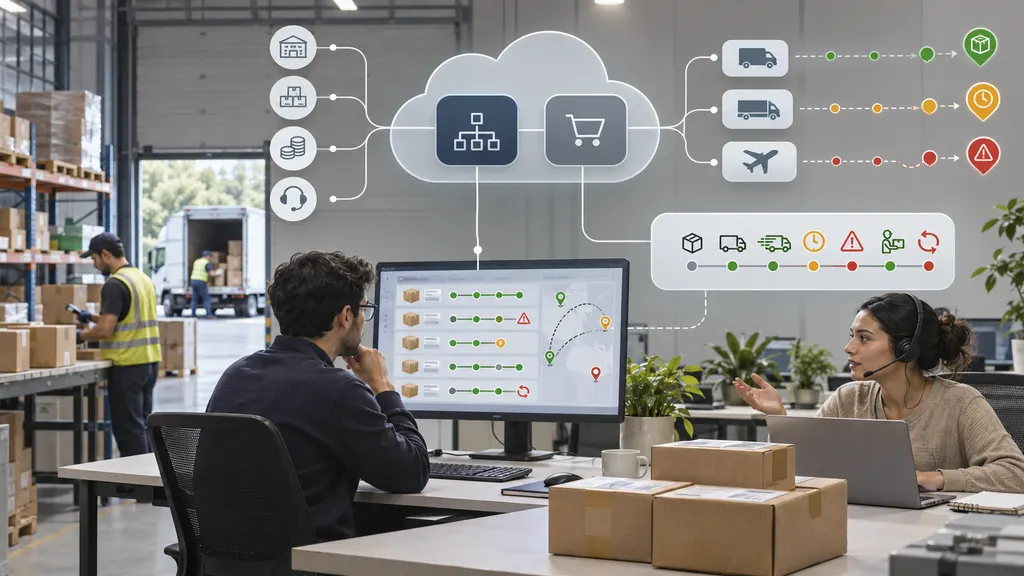
For an ecommerce business, this is not only a customer-service feature. Shipment visibility affects fulfillment decisions, exception handling, inventory planning, refund investigations, and the post-purchase experience. The value of an integration depends on how well the API fits the company’s carriers, markets, order volume, data model, and monitoring process.
What ERP and OMS Platforms Actually Manage
An ERP usually provides a broad operational record for the business. Depending on the implementation, it may contain orders, inventory, purchasing, finance, warehouses, suppliers, and fulfillment-related information. An OMS is more focused on order orchestration. It may decide where an order should be fulfilled, coordinate multiple sales channels, manage order status, and support split shipments or returns.
Neither system automatically has complete visibility into carrier movement simply because a tracking number exists. A tracking number is an identifier; it does not by itself provide a normalized, continuously refreshed view of shipment progress. That information must come from a carrier, a logistics data provider, or another tracking service and then be connected to the order record.
This creates a common operational gap. The warehouse may mark an order as shipped, while the carrier later reports a failed delivery attempt, customs delay, address issue, or delivered event. If the ERP or OMS does not receive those events, the business may continue treating the order as successfully in transit. Staff then discover problems through customer complaints, manual searches, or delayed reconciliation.
Why a Tracking API Is More Useful Than Manual Tracking
Manual tracking can work for a small number of shipments, but it becomes difficult to control as carrier count, sales channels, and international orders increase. Employees have to locate the correct carrier, copy tracking numbers, interpret different event names, and update internal records. That process consumes time and creates inconsistent data.
A tracking API provides a system-to-system connection. The ERP or OMS can submit tracking information and receive shipment events in a structured format, subject to the provider’s supported methods and account configuration. The integration can then map those events to internal statuses such as shipped, in transit, exception, out for delivery, delivered, or returned.
The main benefit is not simply automation. It is the creation of a shared operational view. Customer service, fulfillment, finance, and ecommerce teams can work from the same shipment state instead of maintaining separate spreadsheets, browser tabs, or carrier-specific procedures.
1. One shipment view across multiple carriers
Many businesses use different carriers for domestic, international, express, economy, and marketplace orders. Each carrier can expose different event names, formats, timestamps, and exception descriptions. A multi-carrier tracking service can reduce the amount of carrier-specific logic that an ERP or OMS must maintain.
Before selecting a provider, the integration owner should verify the carriers and services that matter to the business. A general statement about broad carrier support is not enough for implementation planning. The team should confirm whether the required carriers, destination countries, shipment types, and tracking-number formats are supported and whether the available event data is sufficient for internal workflows.
2. More accurate order statuses
An order status such as “shipped” usually means that fulfillment has handed the parcel to a carrier or created a shipment record. It does not necessarily mean that the parcel is moving normally. Tracking events add a second layer of information that shows what is happening after dispatch.
With suitable status mapping, an OMS can distinguish between a parcel that is moving normally and one that needs attention. That distinction can improve customer-service triage and prevent teams from treating every post-purchase inquiry as an order lookup. It also helps avoid confusing fulfillment completion with delivery completion.
3. Earlier exception handling
Delivery exceptions are operational signals. A delay, failed attempt, customs event, address problem, or return-to-sender event may require a different response from a normal in-transit update. When tracking information reaches the ERP or OMS in a usable form, the business can define rules for review, notification, escalation, or case creation.
The right action depends on the business. A high-value international order may need a customer-service review, while a low-risk domestic shipment may only require a notification. The API does not replace those decisions; it supplies the event data needed to make them consistently.
4. Better customer and support workflows
Customers generally want answers to practical questions: Has the order shipped? Where is it now? Is the delivery delayed? What should happen next? If the support team cannot access current tracking information, agents may provide vague answers or ask customers to wait while they investigate.
Connecting tracking events to the order record gives support agents context without requiring them to search every carrier separately. It can also support customer-facing order pages, email updates, or other post-purchase experiences when those features are implemented by the business. Clear delivery communication can reduce avoidable contacts, although the actual effect should be measured rather than assumed.
How Tracking Data Fits Into an ERP or OMS Architecture
A practical integration normally has several stages. The exact architecture varies, but the following sequence helps teams identify gaps before development begins.
- Capture shipment data. The ERP, OMS, warehouse system, or fulfillment workflow records the order reference, tracking number, carrier information, and any relevant service or package data.
- Send or register the tracking number. The integration submits the required information to the tracking provider using the provider’s documented authentication and request format.
- Retrieve or receive events. The system obtains tracking updates using the methods made available by the provider. The implementation should clarify refresh behavior, event delivery, retry logic, and rate limits before production launch.
- Normalize carrier events. Different carrier descriptions should be mapped to the company’s internal status model. The mapping should preserve the original event and timestamp so that teams can investigate discrepancies.
- Apply business rules. The OMS or related workflow can determine when to notify a customer, open an exception case, alert a warehouse team, or request manual review.
- Expose the result. The final status can be shown in internal dashboards, customer-service tools, order pages, or customer communications, depending on the company’s design.
This process reveals why an API project is more than a simple “connect the tracking number” task. Data ownership, status definitions, duplicate events, time zones, partial shipments, split orders, returns, and failed requests all need clear handling.
Integration Requirements to Check Before Development
A reliable evaluation starts with the business’s actual shipment profile. Create a representative sample that includes domestic and cross-border orders, multiple carriers, delivered parcels, delayed parcels, returns, and shipments with incomplete or unusual tracking data. Use that sample to test the following areas.
- Carrier and service coverage: Confirm support for the carriers and services used in target markets. Do not rely only on a generic carrier list; check the specific flows required by the business.
- Data fields: Identify whether the integration returns the events, locations, timestamps, delivery estimates, signatures, links, and exception details required by the ERP or OMS.
- Update model: Determine whether the system uses polling, callbacks, webhooks, or another documented mechanism. Confirm how updates are triggered and how missed events are recovered.
- Authentication and security: Review credential handling, environment separation, access controls, logging, and the treatment of customer or order information.
- Idempotency and duplicates: Design the integration so that repeated events do not create duplicate notifications, cases, or status changes.
- Monitoring: Track failed requests, delayed updates, unsupported tracking numbers, authentication errors, and abnormal event volumes.
- Commercial model: Confirm the provider’s current account, usage, and support terms directly before procurement. Pricing and quotas can vary by product and plan.
API monitoring deserves particular attention. A tracking integration can be technically available while still being operationally unreliable if requests fail silently or status updates stop without an alert. Monitoring should cover both technical health and business freshness. For example, a request may return successfully while a shipment remains unchanged for an unusual period. That situation may require investigation rather than an assumption that the parcel is progressing normally.
Where 17TRACK Fits
For teams evaluating a multi-carrier tracking API, 17TRACK provides an official Tracking API product page and separate developer documentation. These are the appropriate starting points for checking the available integration model, technical requirements, supported data, and account conditions.
17TRACK also describes multi-carrier tracking as a way to connect shipment visibility with ecommerce and logistics operations in its official multi-carrier tracking resource. That positioning is relevant to ERP and OMS projects because the central requirement is usually not a branded tracking page alone. It is the ability to bring shipment information into an existing operational workflow.
A sensible evaluation should still use the company’s own carrier mix and test cases. The API documentation and commercial terms should be reviewed for the intended markets, expected request volume, event requirements, and monitoring design. Public product information can establish relevance, but it should not be treated as a substitute for a technical proof of concept.
When Integration May Not Be the Right First Step
Not every organization needs a full ERP or OMS integration immediately. If the business has low shipment volume, one carrier, limited customer inquiries, and no need for automated exception workflows, a simpler operational process may be sufficient. An API project also needs ownership. Without someone responsible for data mapping, failure handling, and ongoing maintenance, the connection can become another unmanaged dependency.
Integration may also be premature when the internal order model is not defined. Before development, decide how the business represents split shipments, partial deliveries, canceled orders, replacement orders, return-to-sender cases, and delivered-but-disputed orders. A tracking API can provide events, but it cannot resolve unclear internal business rules.
A Practical Implementation Checklist
- List every carrier, service, destination region, and sales channel in scope.
- Document the current ERP and OMS shipment-status definitions.
- Map external carrier events to internal statuses without losing the original event.
- Define the required behavior for partial shipments, duplicates, missing tracking numbers, and returns.
- Choose representative test shipments, including normal and exception cases.
- Confirm API authentication, request limits, update methods, support process, and commercial terms.
- Create alerts for failed calls, stale updates, and unsupported carrier or tracking-number cases.
- Measure operational outcomes such as manual lookups, exception response time, status accuracy, and customer contacts.
The strongest business case for shipment tracking API integration is therefore operational, not cosmetic. When tracking data is connected to the systems that control orders and fulfillment, teams can respond to delivery events using consistent rules. The result is a more complete order record, better visibility across ecommerce logistics, and a clearer foundation for delivery experience improvements.
FAQ
Does an ERP automatically provide shipment tracking?
Not necessarily. An ERP may store tracking numbers and shipment records, but current carrier events usually require a direct carrier connection, a tracking service, or another documented data source. The exact capability depends on the ERP configuration and integrations in use.
What is the difference between an OMS status and a tracking event?
An OMS status represents the business’s view of an order, such as allocated, fulfilled, or shipped. A tracking event describes a carrier-reported movement or condition, such as accepted, delayed, out for delivery, or delivered. The integration maps relevant events to internal statuses while preserving the underlying carrier information.
Should every tracking event trigger a customer notification?
No. Notification rules should reflect the event’s usefulness, confidence, and customer impact. Routine scans may be grouped, while a meaningful delay or delivery exception may warrant a separate message. The business should test notification frequency to avoid both silence and message overload.
What should a company test in a tracking API proof of concept?
Test the carriers and shipment types that represent real operations, including delivered, delayed, returned, split, and international shipments. Also test authentication failures, duplicate events, missing data, stale updates, retry behavior, and the mapping between external events and internal ERP or OMS statuses.
Is a tracking API useful for cross-border ecommerce?
It can be particularly useful when orders move through multiple carriers or handoffs, but support must be verified for the specific lanes, services, and data requirements involved. Cross-border workflows may also require separate handling for customs events, local delivery partners, and destination-country exceptions.