USPS Accepted Tracking Status: What It Means and When the Next Scan Appears
“Accepted” in USPS tracking means USPS has recorded the package as received into its mailstream. It does not mean the package is out for delivery or guarantee that every movement will appear in tracking. The next update may show processing at a facility, departure, arrival elsewhere, or another handling event. There is no fixed time when that scan must appear.
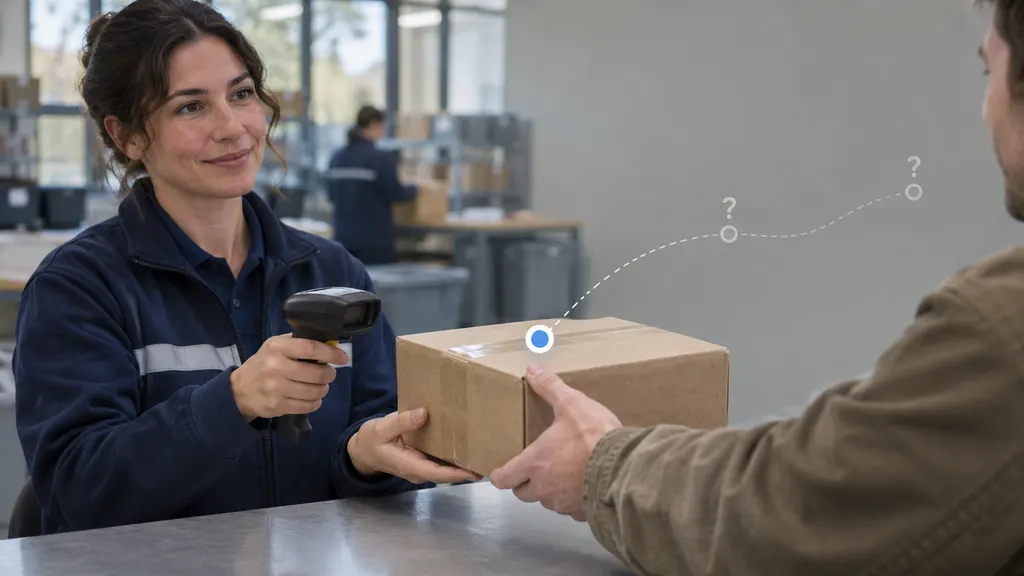
If you are waiting on a package, the useful distinction is between accepted and moving without a visible update and not yet accepted at all. The status wording, mailing date, and estimated delivery date help you decide whether to keep watching or contact the sender or USPS.
What “Accepted” tells you—and what it does not
An acceptance event is stronger evidence of a USPS handoff than “Shipping Label Created” or “USPS Awaiting Item.” A label can exist before the sender gives USPS the package. An accepted package, by contrast, has an event indicating that USPS received it. The event may identify a post office, a USPS facility, or another acceptance location.
Read the complete event, not just the word “Accepted.” USPS may display wording such as “USPS in possession of item” or an acceptance event associated with a particular facility. A status that says acceptance pending requires more care: it should not be treated as the same confirmation of an individual package’s acceptance as a clear “USPS in possession of item” event. If the wording is ambiguous, use the full event history on the official USPS tracking page rather than relying on a shortened status in a shopping app or message.
Acceptance confirms a recorded starting point, not the package’s exact present location. It also does not establish that a delivery date is guaranteed. USPS tracking is a sequence of recorded events, not a continuous location feed; a package can move between scans without a new public update.
When should the next USPS scan appear?
There is no universal interval between “Accepted” and the next visible scan. The package may be processed at an origin facility, travel before another event is recorded, or appear at a downstream facility without a visible departure scan. The timing depends on when and where it entered the network, the service used, the route, and when handling events become available in tracking. An acceptance event late in the day can therefore be followed by a quiet period without proving that the package is stuck.
The next status is often related to processing or transit, but tracking does not always display every step in order. For example, the next visible event might be an arrival at a facility rather than a departure from the acceptance location. A later scan can also clarify where a package has traveled during a period with no updates.
Judge the gap against the shipment’s estimated delivery date and the overall history, not an assumed rule that every package must update overnight. USPS explains tracking as information drawn from scans and other events during a package’s journey; it does not provide a promise that each physical handoff will produce an immediately visible scan. If the estimated delivery date is still ahead and the history shows a recent acceptance event, checking again later is usually more useful than filing an inquiry immediately.
How to interpret the next status
- Arrived at or departed a USPS facility: The package has a recorded processing or transit event. The facility name tells you where that event was recorded, not necessarily where the package is right now.
- Moving Through Network or In Transit: USPS is reporting progress through its network. This wording alone does not identify a precise current location or guarantee a delivery day.
- Arrived at Post Office: The package has a recorded arrival at a post office. Wait for a delivery-specific status before assuming it is on a carrier’s route.
- Out for Delivery: USPS reports that the package is in the delivery stage. It is a more useful indicator of an imminent delivery attempt than “Accepted,” though an attempt can still be affected by circumstances on the route.
- Delivered or a delivery exception: Read the full event and location details. A delivered scan, attempted delivery, or other exception calls for a different response than a package that simply has not had another transit scan.
The labels shown for a particular shipment can differ from these examples. What matters most is the event sequence: the most recent status, its time and location, and whether it changes what the recipient should do.
Accepted but no updates: a practical check
- Confirm the tracking number and full history. Enter the number directly on USPS tracking. Check whether “Accepted” is the latest event or merely an earlier event summarized by a seller’s page. Look for a new event that may have been added since the notification you received.
- Check the mailing and estimated delivery information. Note when the acceptance event was recorded and whether the estimated delivery date has passed. A quiet period before that date is different from an overdue package with no subsequent scans.
- Look for an action-specific status. “Available for Pickup,” “Notice Left,” an address-related exception, or a delivery attempt may require action now. Treat those messages differently from a routine gap after acceptance.
- Ask the sender for mailing details if something does not match. The sender can confirm the service, the date the package was handed over, and the destination ZIP Code on the label. A recipient should not need to disclose a full address to a stranger merely to check a tracking status.
- Escalate through USPS if the package is overdue or appears lost. Start with the official tracking and help pages. USPS’s Missing Mail guidance explains the available inquiry and search options and any eligibility conditions. Have the tracking number and shipment details ready.
A missing intermediate scan is not, by itself, proof that a package is lost. Equally, “Accepted” is not proof that the package will arrive on the original estimate. The strongest reason to act is a combination of an overdue shipment, no meaningful progress, and no status that explains the delay.
What the sender and recipient should do differently
If you are the recipient, verify the status with USPS, watch for an exception that requires your response, and contact the seller if the package becomes overdue. The sender generally has the clearest access to the mailing receipt, label information, and details of the original handoff. If a purchase is involved, keep the seller informed rather than assuming a tracking gap can be resolved only by the recipient.
If you are the sender, retain the acceptance receipt or other available handoff record and check that the tracking number belongs to the correct order. When answering a buyer, describe what the history actually shows: “USPS accepted the package, and no later scan is visible yet” is more accurate than “It will arrive tomorrow.” If the expected delivery date passes, use the applicable USPS help process and keep the buyer updated on concrete steps taken.
For businesses handling many shipments, it is useful to distinguish a label-only order from an accepted package, and both from a package with subsequent movement. Those are different customer-support situations. A clear message based on the latest recorded event helps avoid promising a location or delivery time that tracking cannot confirm.
Acceptance status for international shipments
An international package may have more than one carrier or postal operator involved. A USPS acceptance event identifies a recorded USPS handoff, but it does not mean every later event—including activity outside the United States—will appear with the same wording or at the same pace. Customs processing and handoffs can also affect when another update becomes visible.
Check which organization currently has responsibility for the shipment before interpreting a quiet tracking page. If USPS is the destination carrier, a seller or overseas carrier may show earlier events that do not establish USPS acceptance. Conversely, when USPS handled the outbound leg, later updates may depend on the destination postal operator. Do not interpret a missing USPS scan as proof of a customs problem unless a status or other reliable information actually indicates one.
The bottom line
“Accepted” is a useful confirmation that USPS has recorded receipt of the package. The next scan has no guaranteed appearance time, and the absence of an intermediate event does not necessarily mean movement has stopped. Check the full USPS history, compare it with the estimated delivery date, and act promptly on exceptions. If the package is overdue with no useful update, move from repeated refreshing to a sender inquiry or the appropriate USPS help process.
FAQ
Does “Accepted” mean USPS has my package?
A clear acceptance event indicates that USPS has recorded receipt of the package. Check the complete wording: “acceptance pending” should not be read as identical to an individual-package event confirming USPS possession.
Why did my package go from “Accepted” straight to a distant facility?
Tracking does not necessarily show every processing or departure event. The distant-facility scan records where the next visible event occurred; it does not mean the package skipped physical handling along the way.
Can USPS deliver a package without another scan after acceptance?
Not every intermediate movement must appear in the public history, so a delivery-related event may be the next useful update you see. Do not count on that outcome, though. If the package becomes overdue, follow up using the tracking number and shipment details.
Is “Accepted” the same as “Shipping Label Created”?
No. “Shipping Label Created” indicates that shipment information has been generated; it does not, on its own, confirm that USPS received the package. An acceptance event records a USPS handoff.
What should I do if “Accepted” is the last update and the delivery estimate has passed?
Check the official USPS history for a newer event or exception, then contact the sender to verify the mailing details. If the shipment still appears missing, review USPS’s Missing Mail guidance for the appropriate inquiry or search option.
Sources
- USPS, “USPS Tracking: The Basics” — tracking events, status information, and the limits of tracking visibility.
- USPS, official tracking tool — checking a shipment’s complete recorded history.
- USPS, Missing Mail and Lost Packages — help options for mail or packages that have not arrived.