Über Studio Oh!
At Studio Oh! we aim to create inspiring, charming and unexpected products by transforming everyday items into treasured belongings. Our unique and original artwork highlights witty and whimsical designs to celebrate the little moments in life that make us smile.
How do I track my Studio Oh! order?
You can track your Studio Oh! order using two simple methods:
Using This Tracking Page:
- Enter your tracking number in the input box on this page.
- Click the "Track my order" button to get real-time updates on your package status.
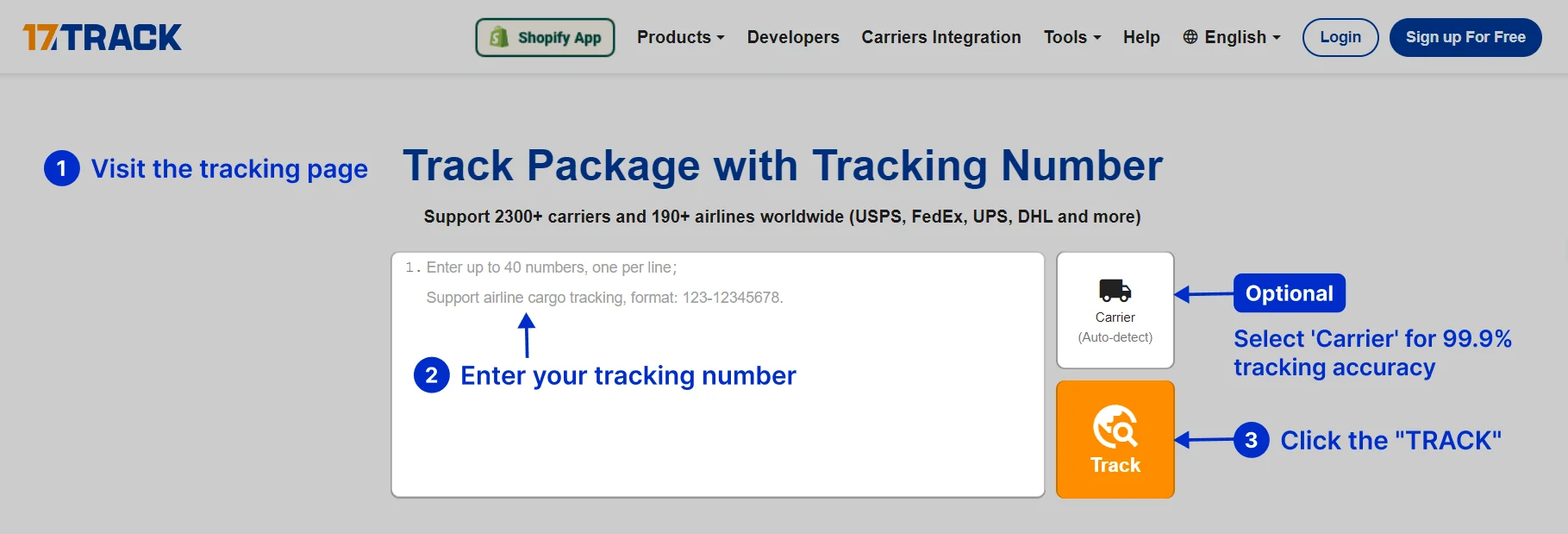
Visiting the 17TRACK Website:
- Go to the 17TRACK tracking page.
- Enter your tracking number in the search bar at the top of the homepage.
- Click the "Track" button to view the latest information on your shipment.
How to find your tracking number?
Your tracking number can usually be found in several places:
- Order Confirmation Email: When you place an order, Studio Oh! sends a confirmation email that includes your tracking number.
- Shipping Notification Email: Once your order has been shipped, you will receive a shipping notification email containing the tracking number.
- Studio Oh! Account: Log in to your Studio Oh! account, go to "My Orders" and select the order you want to track. The tracking number will be listed there.
- Shipping Label or Receipt: Check the shipping label or receipt you received with your package. The tracking number is usually printed there.
- Contact Shipping Carrier: Reach out to the customer service of the shipping carrier with your order details. They can provide you with the tracking number.
How to track Studio Oh! order without tracking number?
If you do not have a tracking number, you can still track your order by:
- Contacting Studio Oh! Customer Service: Reach out to Studio Oh!'s customer service with your order details, such as order number, email address, and shipping address. They can provide you with the tracking number.
- Checking Your Studio Oh! Account: Sometimes, the tracking number is updated in your order details in your Studio Oh! account even if you did not receive an email notification.
- Using Order Reference Number: Some brands allow tracking with the order reference number instead of the tracking number. Check the Studio Oh! website or contact their support for this option.
Why choose 17TRACK to track your Studio Oh! packages?
Choosing 17TRACK to track your Studio Oh! packages offers several benefits:
Comprehensive Integration: 17TRACK integrates with over 2,400 carriers, including USPS, UPS, DHL, FedEx, and many more, providing a seamless tracking experience.
Real-time Updates: Get precise and timely updates about your package status with tracking accuracy up to 99.9%.
Global Reach: 17TRACK is used by over 15 million users from 220+ countries and areas.
Multi-Language Support: Supports 33 languages, enhancing the user experience for global users.
Batch Tracking: Track up to 40 packages simultaneously by entering multiple tracking numbers.
24/7 Support: Access customer support anytime for any queries or issues.
Join the millions of satisfied users who trust 17TRACK for their Studio Oh! tracking needs. Enter your Studio Oh! tracking number to access real-time tracking updates, track shipping status, and stay informed about your package’s delivery progress. Enjoy the convenience and precision of 17TRACK today, ensuring you never miss your package!















